
This section reviews the basic architecture of a Web application as well as the core Web-centric technologies used in this process. A Web Application can be understood to be a collection of related files (.htm, .aspx. .asax, .ascx, etc.) and related components (.NET or COM) stored on a Web Server. A Web Server is a software product in charge of hosting the Web Application and typically provides a number of related services such as integrated security, FTP, SMTP and so forth. An example of a widely used web server is Microsoft's Internet Information Server (IIS). When creating ASP.NET applications, you will have to interact with IIS (directly and indirectly).
An IIS installation is capable of hosting many web applications, with each web application running in its own virtual directory where each virtual directory is mapped to a physical directory on the local hard drive. For example, www.diranieh.com might map to a virtual directory called Diranieh which in turn points to a physical directory called c:\Diranieh.
When building ASP.NET Web Applications, you will not be able to escape the use of HTML. You still need to feel somewhat comfortable with HTML when working with ASP.NET.
An HTML file consists of a set of core HTML tags 2 kinds of information:
HTML files created by the IDE contain the following:
<!-- <HTML> tags mark the beginning
and end of the document -->
<HTML>
<!-- HEAD tags are used to describe
the content of the document -->
<HEAD>
<TITLE>This title will appear in
the explorer's caption</TITLE>
<META HTTP-EQUIV="Content-Type" content="Text/Html">
</HEAD>
<!-- BODY tags enclose all the real
action. You can have here any number of tags used
to render text and image contents -->
<BODY>
<!- Insert HTML here -->
</BODY>
</HTML>
The following document illustrates a very basic HTML document with some of the more frequently used tags. Output from this document is shown afterwards:
<!DOCTYPE HTML PUBLIC "-//W3C//DTD HTML 4.0 Transitional//EN">
<html>
<head>
<title></title>
<meta name="GENERATOR" content="Microsoft Visual Studio.NET 7.0">
<meta name="vs_targetSchema"
content="http://schemas.microsoft.com/intellisense/ie5">
</head>
<body>
<!-- This is how a comment should be declared -->
<!-- <p> tags are used to make text flow over multiple lines -->
<p>This line is delimited by "p" tags</p>
<p>And so is this line!</p>
<!-- <br> is used to insert a blank line
-->
<br>
<br>
This line is preceeded by 2 br tags
<!-- <b> and <i> can be used to format
the text -->
<br>
<b>This text is made bold using the b tags</b><i>This text is made italics using
the i tags</i>
<!-- header tags are used to alter the size of the text -->
<h1>This is h1</h1>
<h6>and this is h6</h6>
<!-- Centering text -->
<center>This text is centered</center>
</body>
</html>
Finally it is worth noting that VisualStudio.NET IDE allows you to visually configure almost all aspects of the HTML document via the Properties window. The IDE also provides the HTML Formatting toolbar which allows you to easily modify the appearance of text. Therefore, the IDE makes it easy to build the content of your HTML document using a word-processor like approach.
There are three basic problems with classic ASP:
Below is a reminder of how a classic ASP page gets processed:
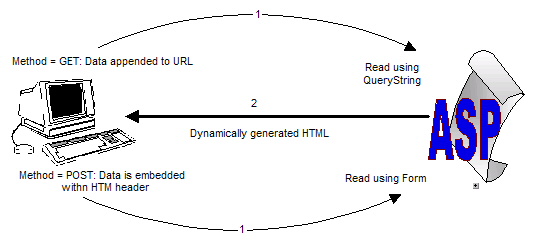
ASP.NET was designed to address each of the limitations of classic ASP. First and foremost, ASP.NET does not use scripting languages. ASP.NET allows the use of real programming languages like C++, C#, VB.NET and other .NET compliant languages. This means that if you are a desktop or enterprise application developer who uses C# or even Managed C++, then you can easily apply everything you know about C#, Managed C++ and the .NET Framework to the world of ASP.NET.
Next, ASP.NET provides many ways to reduce the amount of code you have to write. For example, through the use of server-side Web Controls, you can build a browser-based front end using various GUI widgets that emit HTML tags. Other Web Controls are used to validate your GUI items and this decreases the amount of client-side script required to validate user input.
ASP.NET has various other advantages. For example, all ASP.NET development is done via the VisualStudio.NET IDE, intellisense, integrated debugging with other modules, and so on.
The .NET Framework contains many namespaces that represent Web-based technologies. Generally speaking, these namespaces can be divided into three major categories:
Here are some of the more important web-related namespaces:
| Web-centric namespace | Notes |
| Core Web Atoms | |
| System.Web | Core types that enable browser/web server communication (request, response, cookies, etc.) |
| System.Web.Caching | Types that facilitate caching support for a web application. |
| System.Web.Configuration | Types that allow you to configure your web application in conjunction with the project's web configuration file |
| System.Web.Security | Security support for a web application. |
| UI | |
| System.Web.UI | These namespaces allow you to build a GUI fornt-end |
| System.Web.UI.WebControls | |
| System.Web.UI.HtmlControls | |
| Web Services | |
| System.Web.Services | These namespaces allow you to build Web Services. Web Services are covered in a separate chapter (from the left-hand main menu) |
| System.Web.Services.Description | |
| System.Web.Services.Discovery | |
| System.Web.Services.Protocols | |
System.Web namespace defines the minimal and complete set of core types that allow browser/server communication and interaction. The following table introduces some of the most important items that you should be familiar with:
| System.Web Type | Notes |
| HttpApplication | Defines members common to all ASP.NET applications. The global.asax file defines a class that derives from HttpApplication. |
| HttpApplicationState | Enable developers to share global information across multiple requests, sessions, and pipelines. |
| HttpBrowserCapabilities | Enables server to collect information on the capabilities of the browser running on the client. |
| HttpCookie | Provides a type-safe way to access multiple Http cookies. |
| HttpRequest | Provides an object-oriented way to enable browser-to-server communication (gains request ot the Http data supplied by the client.) |
| HttpResponse | Provides an object-oriented way to enable server-to-browser communication (used to send output to the client.) |
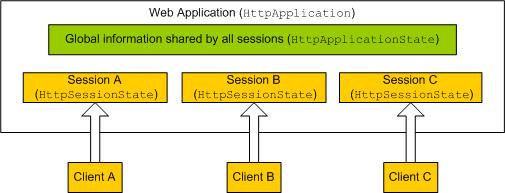
An ASP.NET Web session encompasses a single user's interaction with the ASP.NET application. A session holds user state across multiple page invocations. This ensures that each user has an allocated block of memory that represents the user's interaction with the ASP.NET application across multiple pages. This session information is represented programmatically by the HttpSessionState type. So if 33,000 people are using and accessing a particular ASP.NET Web application, then there will be 33,000 different HttpSessionState objects each holding user-specific state.
Recall that the HttpApplication type represents common methods, properties and events for a given web applications. The global.asax file defines a single type named Global that derives from HttpApplication base class. Closely related to the HttpApplication base type is the HttpApplicationState mentioned above type which enables you to share global information across multiple sessions in an ASP.NET applications. ASP.NET exposes the applications and session objects via properties of a Page-derived type.
. These concepts are summarized in the figure below:
VisualStudio.NET offers an integrated environment for building and debugging ASP.NET applications. The following code shows the minimal amount of code added by VS.NET for the main .aspx file:
<!-- The @Page directive defines page-specific attribute for the
current page as follows:
language = "C#":
The name of the language used behind the scenes to construct the logic for this page is C#
Codebehind="default.aspx.cs"
The name of the C# file implementing the logic for this page
Inherits="BasicApp.WebForm1"
Specifies the name of the class defined in the file referred to by the Codebehind attribute
AutoEventWireup="false"
sets up how the page will handle events. ASP.NET event handling is different than in normal
.NET application. This will be discussed later
-->
<%@ Page language="c#" Codebehind="default.aspx.cs" AutoEventWireup="false" Inherits="BasicApp.WebForm1" %>
<!DOCTYPE HTML PUBLIC "-//W3C//DTD HTML 4.0 Transitional//EN" >
<html>
<head>
<title>Basic ASP.NET</title>
<meta name="GENERATOR" Content="Microsoft Visual Studio 7.0">
<meta name="CODE_LANGUAGE" Content="C#">
<meta name="vs_defaultClientScript" content="JavaScript">
<meta name="vs_targetSchema"
content="http://schemas.microsoft.com/intellisense/ie5">
</head>
<body MS_POSITIONING="GridLayout">
<!-- Outputing some info. Note that language used inside the <%= %> tags
is not script but C# -->
<h1><%= this.ToString()
%></h1>
<%=
Request.ServerVariables["HTTP_USER_AGENT"] %>
<!-- the runat attribute is the heart and sole of ASP.NET. It is uses to mark
an item for processing by the ASP.NET processing engine to generate HTML back
to the browser-->
<form id="Form1" method="post" runat="server">
</form>
</body>
</html>
Recall that <%= %> is one the simplest ways to display information. The value that is entered after the equals sign is written to the current page. This construct is most useful for displaying single pieces of information.
Similar to ASP, ASP.NET also defines a global file (globals.asax) that allows your applications to interact with application-level and session-level events as well as share global data. Note in the following skeletal globals.asax file how HttpApplication base class is used:
using System;
using System.Collections;
using System.ComponentModel;
using System.Web;
using System.Web.SessionState;
namespace BasicApp
{
/* In certrain respects, the Global
class can be thought of as the intermediary between
the external client and the Web Form*/
public class Global : System.Web.HttpApplication
{
public Global()
{
InitializeComponent();
}
/* The following
events allow the ASP.NET application to respond to initialization and
termination events of the Web
application and its individual sessions */
protected void Application_Start(Object sender, EventArgs e)
{
}
protected void Session_Start(Object sender, EventArgs e)
{
}
protected void Application_BeginRequest(Object sender, EventArgs e)
{
}
protected void Application_EndRequest(Object sender, EventArgs e)
{
}
protected void Application_AuthenticateRequest(Object sender, EventArgs e)
{
}
protected void Application_Error(Object sender, EventArgs e)
{
}
protected void Session_End(Object sender, EventArgs e)
{
}
protected void Application_End(Object sender, EventArgs e)
{
}
#region Web Form Designer generated code
/// <summary>
/// Required method for Designer support - do not modify
/// the contents of this method with the code editor.
/// </summary>
private void InitializeComponent()
{
}
#endregion
}
}
The script block for the generated .aspx file contained a Page directive with a Codebehind attribute:
<%@ Page language="c#" Codebehind="default.aspx.cs" AutoEventWireup="false" Inherits="BasicApp.WebForm1" %>
One of the major differences between classic ASP and ASP.NET is that that .aspx file which is requested by the client is now represented by a C# class. The C# class is identified by the Inherits attribute. Therefore, when a client requests a particular .aspx page, an object of the class identified by the Inherits attribute will be instantiated and maintained by the ASP.NET processing engine. Here is the initial code block for the .cs file referenced by the above Codebehind attribute:
using System;
using System.Collections;
using System.ComponentModel;
using System.Data;
using System.Drawing;
using System.Web;
using System.Web.SessionState;
using System.Web.UI;
using System.Web.UI.WebControls;
using System.Web.UI.HtmlControls;
namespace BasicApp
{
public class WebForm1 : System.Web.UI.Page
{
// The Load
event handler. The Load event occurs after the Init event. This is the place
// to configure the look and feel of
WebControls
private void Page_Load(object sender,
System.EventArgs e)
{
//
Put user code to initialize the page here. This is the ideal place to connect to
a
// data
source and perform necessary preparation work
}
#region Web Form Designer generated
code
// The Init
event (OnInit is its handler) is fired when the page is initialized and is
// the first step in the page's
cycle.
override protected void
OnInit(EventArgs e)
{
// CODEGEN:
This call is required by the ASP.NET Web Form Designer.
InitializeComponent();
base.OnInit(e);
}
// Required
method for Designer support - do not modify the contents of this method with the
code editor.
private void InitializeComponent()
{
this.Load +=
new System.EventHandler(this.Page_Load);
}
#endregion
}
}
We can begin to understand the purpose of the above auto-generated class by examining the System.Web.UI.Page type. The Page class defined all the properties, methods and events common to all pages processed by the ASP.NET engine. Some of the core properties are Application, Session, Request, Response, Server and many others. Therefore, the Page class defines properties that correlate to the intrinsic object model supported by classis ASP.
The C# class represented by the Codebehind attribute can be extended with any number of custom properties and/or methods. These custom methods and properties can be called indirectly using <% ... %> code blocks in the .aspx file. Compare this separation of logic with classic ASP where each page was hodge-podge of HTML tags and server-side scirpts.
Assume you added a custom method called GetDataTime() to the Page-derived class. To call this method from within the .aspx file you can either call the method using Response.Write of you can call it directly:
<!-- Approach one -->
<body>
<!-- Get current time -- >
<% Response.Write(GetDateTime()) %.
<body>
public void GetDataTime()
{
return DateTime.Now.ToString()
}
<!-- Approach two. Note that this
approach requires changes to the .cs as shown in the next code blcok -->
<body>
<!-- Get current time -- >
<% GetDateTime(); %>
<body>
public void GetDataTime()
{
this.Response.Write( DateTime.Now.ToString() );
}
The basic flow of information starts with a client browsing to a page, filling in some personal (or log in) information and then clicking a Submit button maintained by an internal HTML form. In most cases, the opening tags of the form specify action and method attributes:
<form name=MainForm ID=MainFormID action="http://localhost/LogUser.aspx" method=get >
The action attribute specifies which file on the server will be sent the data in the various HTML widgets surrounded by the <form> tag, and the method attribute specifies how to send this data (get or post).
In ASP.NET, the Page.Request property is used to gain access to the data sent by the HTTP request, whether this request was sent via get or post.
Under the hood, the Page.Request property manipulates an instance of HttpRequest type whose members include:
The Page.Response property provides access to an internal HttpResponse type which contain a number of properties and methods that allows you to format the HTTP response sent back to the client. Some of the most common are Flush(), Redirect(), Write(), IsClientConnected, and others. For example, the following statement,
<%= Request.ServerVariables["HTTP_USER_AGENT"] %>
is exactly equivalent to,
<%
HttpRequest rq = this.Request;
HttpResponse rs = this.Response;
rs.Write( rq.ServerVariables["HTTP_USER_AGENT"] );
%>
The Page.Application property provides access to the underlying HttpApplicatonState type which enables developers to share global information across multiple sessions in an ASP.NET applications. The Page.Application property is used by establishing key/pair values and inserting them into the internally maintained KeyCollection using the class indexer:
// Create an application-level data
member
Application["Database"] = "Northwind";
// And to extract it
string strDB = Application["Database"];
As mentioned above, a session holds user's state across multiple page invocations. The Page.Session property is used to hold stateful information per user and it works just like the Page.Application property.
// Create a session-level data
member
this.Session["UserName"] = System.Security.Principal.WindowsIdentity.GetCurrent().Name;
// And to extract it
string strDB = Session["UserName"];
With ASP.NET, you can use the same debugging techniques as you would for any other VisualStudio.NET applications. Therefore, you can set breakpoints inside scripts, C# / VB.NET code and then start a debug session as usual.
To facilitate debugging, you can also enable the Trace attribute to true:
<%@ Page language="c#" Codebehind="default.aspx.cs" trace=true ... %>
You can also insert your own trace statements inside code behind modules using the System.Diagnostics namespace or inside script blocks <% %>:
<%
Trace.WriteLine( "Opening database connection ..."
);
...
%>
Web Form controls have many great advantages:
For example, in classic ASP, to display a series of text boxes, you basically needed to type the HTML tags directly into the Web page. However, with ASP.NET you simply design your Web Form using the design-time template and Web controls:
<asp:TextBox id="TextBox1" style="Z-INDEX: 102; LEFT: 186px; POSITION: absolute; TOP: 44px" runat="server" Width="131px" Height="21px"></asp:TextBox>
When the ASP.NET runtime engine encounters this tag, it will replace it with the appropriate HTML tags ( <input type=text name=TextBox1 ... /> ) in the response stream sent back to the client.
Web Form controls are accessed from the Web Forms tab in your VisualStudio.NET toolbox. After a Web Form control is added (drag and drop from the Web Forms tab), it can be configured using the Properties window. Changes via the Properties window are written immediately to the underlying .aspx file. Note that as you add Web Controls to your .aspx file, a corresponding member variable will be added to the Page-derived class referenced by the Codebehind attribute. The names of these variables is the same as those of the ID attribute defined in the .aspx file. This means you can programmatically manipulate your controls using C# code in <% %> blocks inside the .aspx file or in your custom defined properties and methods in the Page-derived class.
A given Web Control is defined using XML-like syntax in which the opening tag is always <asp:ControlType runat="server" ...>. The closing tag is always </asp:ControlType>. For example:
<asp:TextBox runat="server" ...></asp:TextBox>
<asp:Button runat="server" ...></asp:Button>
<asp:Calendar runat="server" ...></asp:Calendar>
...
The runat="server" attribute indicates that this is a server-side control that should be processed by the ASP.NET runtime engine to produce the necessary HTML and then insert this auto-generated HTML into the response stream sent back to the client.
All ASP.NET server controls (Web Form controls) ultimately derive from a common base class called System.Web.UI.WebControls.WebControl. WebControl derives from Control which derives from Object. This is shown below:
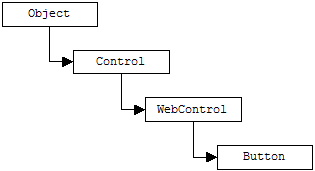
The Control type provides a number of non-GUI related properties. For example, the Page property gets the Page object associated with this control whereas the ID property gets/sets the identifier for the control (this is usually the ID attribute in <asp:controlName ID=... /> tags. Further down the inheritance tree, WebControl provides a number of properties that can be used to set the look and feel of the control - BackColor, ForeColor, BorderStyle, BorderWidth, and so on.
All the types in System.Web.UI.WebControls are GUI-related. However, they can be divided into four separate categories:
These types are basically .NET components that have direct HTML widget counterparts. For example, to display a list of items you use can use a WebForm ListBox:
<asp:ListBox id="ListBox1" style="Z-INDEX: 103; LEFT: 57px; POSITION: absolute; TOP: 100px"
runat="server" ... >
<asp:ListItem Value="BMW">BMW</asp:ListItem>
<asp:ListItem Value="Mercedes">Mercedes</asp:ListItem>
</asp:ListBox>
Place the above on a .aspx page and display in IE. Use View Source context-menu command to view the resulting HTML. You will note that the following HTML was generated for the above code:
<select name="ListBox1" id="ListBox1" size="4" style="height:84px;width:258px;Z-INDEX: 103; LEFT: 57px; POSITION: absolute; TOP: 100px">
<option value="BMW">BMW</option>
<option value="Mercedes">Mercedes</option>
</select>
The following table lists some of the intrinsic WebForm controls
| WebForm Intrinsic Controls | Notes |
| Button, ImageButton | Various button controls. |
| CheckBox, CheckBoxList | A basic check box or a list containing a set of check boxes. |
| DropDownList, ListBox, ListItem | Standard list box. |
| Image, Panel, Label | Containers of static text and images. |
| RadioButton, RadioButtonList | A single radio button or a set of related radio buttons. |
| Textbox | Allows user input. |
The following shows how to create a group of related buttons using individual buttons (note the use of the GroupName attribute), followed by an equivalent code that automatically creates a set of related buttons using RadioButtonList Web control. Both code snippets produce the same effect:
<asp:RadioButton id="RB1" style="Z-INDEX: 104;
runat="server" Text="Visa" GroupName="PaymentMethod"></asp:RadioButton>
<asp:RadioButton id="RB2" style="Z-INDEX: 105;
runat="server" Text="MasterCard" GroupName="PaymentMethod"></asp:RadioButton>
<asp:RadioButtonList id="RadioButtonList1" style="Z-INDEX:106;runat="server">
<asp:ListItem Value="JPEG">JPEG</asp:ListItem>
<asp:ListItem Value="GIF">GIF</asp:ListItem>
<asp:ListItem Value="BMP">BMP</asp:ListItem>
</asp:RadioButtonList>
Output is shown below:

Rich controls are widgets that also emit HTML to the HTTP response stream. The difference between these types and intrinsic controls and is that they have no direct HTML counterpart. Instead they return a huge amount of HMTL tags that simulate such an entity. Examples of two rich controls are AdRotator and Calendar.
The ASP.NET Calendar control:
<asp:Calendar id="Calendar1" style="Z-INDEX: 107; runat="server" Height="102px"></asp:Calendar>
returns this amount of HTML (View Source in IE's context menu):
<table id="Calendar1" cellspacing="0"
cellpadding="2" border="0"
style="border-width:1px;border-style:solid;height:102px;width:245px;border-collapse:collapse;Z-INDEX: 107; LEFT: 66px; POSITION: absolute; TOP:327px">
<tr><td colspan="7" style="background-color:Silver;"><table
cellspacing="0" border="0" style="width:100%;border-collapse:collapse;">
<tr><td style="width:15%;"><a href="javascript:__doPostBack('Calendar1','V1339')"
style="color:Black"><</a></td><td align="Center" style="width:70%;">October 2003</td><td align="Right" style="width:15%;"><a
href="javascript:__doPostBack('Calendar1','V1400')" style="color:Black">></a></td></tr>
</table></td></tr><tr><td align="Center">Mon</td><td align="Center">Tue</td><td align="Center">Wed</td><td align="Center">Thu</td><td align="Center">Fri</td><td align="Center">Sat</td><td align="Center">Sun</td></tr><tr><td align="Center" style="width:14%;"><a
href="javascript:__doPostBack('Calendar1','1367')" style="color:Black">29</a></td><td align="Center" style="width:14%;"><a
href="javascript:__doPostBack('Calendar1','1368')" style="color:Black">30</a></td><td align="Center" style="width:14%;"><a
href="javascript:__doPostBack('Calendar1','1369')" style="color:Black">1</a></td><td align="Center" style="width:14%;"><a
href="javascript:__doPostBack('Calendar1','1370')" style="color:Black">2</a></td><td align="Center" style="width:14%;"><a
href="javascript:__doPostBack('Calendar1','1371')" style="color:Black">3</a></td><td align="Center" style="width:14%;"><a
href="javascript:__doPostBack('Calendar1','1372')" style="color:Black">4</a></td><td align="Center" style="width:14%;"><a
href="javascript:__doPostBack('Calendar1','1373')" style="color:Black">5</a></td></tr><tr><td align="Center" style="width:14%;"><a
href="javascript:__doPostBack('Calendar1','1374')" style="color:Black">6</a></td><td align="Center" style="width:14%;"><a
href="javascript:__doPostBack('Calendar1','1375')" style="color:Black">7</a></td><td align="Center" style="width:14%;"><a
href="javascript:__doPostBack('Calendar1','1376')" style="color:Black">8</a></td><td align="Center" style="width:14%;"><a
href="javascript:__doPostBack('Calendar1','1377')" style="color:Black">9</a></td><td align="Center" style="width:14%;"><a
href="javascript:__doPostBack('Calendar1','1378')" style="color:Black">10</a></td><td align="Center" style="color:White;background-color:Silver;width:14%;"><a
href="javascript:__doPostBack('Calendar1','1379')" style="color:White">11</a></td><td align="Center" style="width:14%;"><a
href="javascript:__doPostBack('Calendar1','1380')" style="color:Black">12</a></td></tr><tr><td align="Center" style="width:14%;"><a
href="javascript:__doPostBack('Calendar1','1381')" style="color:Black">13</a></td><td align="Center" style="width:14%;"><a
href="javascript:__doPostBack('Calendar1','1382')" style="color:Black">14</a></td><td align="Center" style="width:14%;"><a
href="javascript:__doPostBack('Calendar1','1383')" style="color:Black">15</a></td><td align="Center" style="width:14%;"><a
href="javascript:__doPostBack('Calendar1','1384')" style="color:Black">16</a></td><td align="Center" style="width:14%;"><a
href="javascript:__doPostBack('Calendar1','1385')" style="color:Black">17</a></td><td align="Center" style="width:14%;"><a
href="javascript:__doPostBack('Calendar1','1386')" style="color:Black">18</a></td><td align="Center" style="width:14%;"><a
href="javascript:__doPostBack('Calendar1','1387')" style="color:Black">19</a></td></tr><tr><td align="Center" style="width:14%;"><a
href="javascript:__doPostBack('Calendar1','1388')" style="color:Black">20</a></td><td align="Center" style="width:14%;"><a
href="javascript:__doPostBack('Calendar1','1389')" style="color:Black">21</a></td><td align="Center" style="width:14%;"><a
href="javascript:__doPostBack('Calendar1','1390')" style="color:Black">22</a></td><td align="Center" style="width:14%;"><a
href="javascript:__doPostBack('Calendar1','1391')" style="color:Black">23</a></td><td align="Center" style="width:14%;"><a
href="javascript:__doPostBack('Calendar1','1392')" style="color:Black">24</a></td><td align="Center" style="width:14%;"><a
href="javascript:__doPostBack('Calendar1','1393')" style="color:Black">25</a></td><td align="Center" style="width:14%;"><a
href="javascript:__doPostBack('Calendar1','1394')" style="color:Black">26</a></td></tr><tr><td align="Center" style="width:14%;"><a
href="javascript:__doPostBack('Calendar1','1395')" style="color:Black">27</a></td><td align="Center" style="width:14%;"><a
href="javascript:__doPostBack('Calendar1','1396')" style="color:Black">28</a></td><td align="Center" style="width:14%;"><a
href="javascript:__doPostBack('Calendar1','1397')" style="color:Black">29</a></td><td align="Center" style="width:14%;"><a
href="javascript:__doPostBack('Calendar1','1398')" style="color:Black">30</a></td><td align="Center" style="width:14%;"><a
href="javascript:__doPostBack('Calendar1','1399')" style="color:Black">31</a></td><td align="Center" style="width:14%;"><a
href="javascript:__doPostBack('Calendar1','1400')" style="color:Black">1</a></td><td align="Center" style="width:14%;"><a
href="javascript:__doPostBack('Calendar1','1401')" style="color:Black">2</a></td></tr><tr><td align="Center" style="width:14%;"><a
href="javascript:__doPostBack('Calendar1','1402')" style="color:Black">3</a></td><td align="Center" style="width:14%;"><a
href="javascript:__doPostBack('Calendar1','1403')" style="color:Black">4</a></td><td align="Center" style="width:14%;"><a
href="javascript:__doPostBack('Calendar1','1404')" style="color:Black">5</a></td><td align="Center" style="width:14%;"><a
href="javascript:__doPostBack('Calendar1','1405')" style="color:Black">6</a></td><td align="Center" style="width:14%;"><a
href="javascript:__doPostBack('Calendar1','1406')" style="color:Black">7</a></td><td align="Center" style="width:14%;"><a
href="javascript:__doPostBack('Calendar1','1407')" style="color:Black">8</a></td><td align="Center" style="width:14%;"><a
href="javascript:__doPostBack('Calendar1','1408')" style="color:Black">9</a></td></tr>
</table>
WebForm defines a number of server-side controls that emit back HTML tags based on a connection to a data source. While these controls will be mostly fed ADO.NET DataSets, other sources of data such as arrays can be used as long as they implement the IEnumerable interface. In addition to the core datacentric Web Controls like DataGrid and DataList, most intrinsic controls can be configured to display information from a data source.
For example, assuming that a DataSet has already been filled with data, you can bind the contents of the DataSet to the DataGrid as follows:
MyDataGrid.DataSource =
MyDataSet.Tables["Customer"].DefaultView;
MyDataGrid.DataBind();
As for binding to other controls, you can use the following code to bind an array to an ASP.NET ListBox:
string [] aNetLanguages = {"Managed C++",
"C#", "VB.NET" };
lbLanguages.DataSource = aNetLanguages;
lbLanguages.DataBind();
These types are used to ensure that the data submitted by the user is well formatted based on the application logic. The following table shows the core ASP.NET validation controls:
| WebForm Validation Control | Notes |
| CompareValidator | Validates that an input value to an input control is equal to a given value of another control. |
| RangeValidator | Validates that an input value falls within a predetermined range. |
| RegularExpressionValidator | Validates that an input value matches the pattern of a predetermined regular expression. |
| RequierdFieldValidator | Validates that an input control has an input value. |
| ValidationSummary | Displays a summary of all validation errors. Error message can be displayed inline or in a popup box. |
| CustomValidator | Allows you to build a custom validation control. |
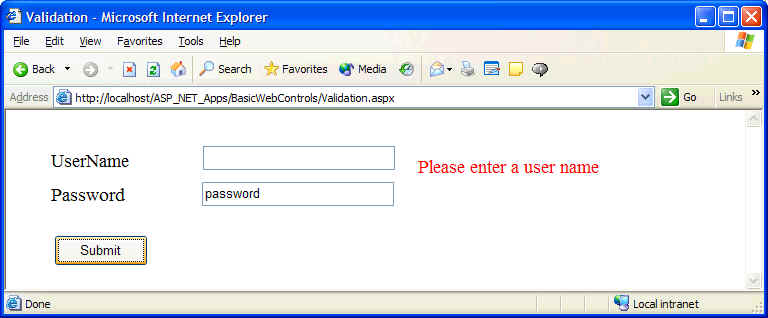
To use these controls, you simply place one of them next to the control to be validated, then set at least the ControlToValidate and ErrorMessage properties of the validator against the control you wish to validate. The following .aspx page illustrates how:
<body MS_POSITIONING="GridLayout">
<form id="Validation" method="post" runat="server">
<asp:TextBox id="txtUserName"
runat="server"></asp:TextBox>
<asp:Label id="Label2" runat="server"
>Password</asp:Label>
<asp:TextBox id="txtPassword"
runat="server" ></asp:TextBox>
<asp:Label id="Label1" runat="server"
>UserName</asp:Label>
<asp:RequiredFieldValidator id="RequiredFieldValidator1"
runat="server"
ErrorMessage="Please enter a user name"
ControlToValidate="txtUserName"></asp:RequiredFieldValidator>
<asp:Button id="Button1" runat="server" Text="Submit"></asp:Button>
</form>
</body>
The following output is generated when the Submit button is clicked leaving the UserName field empty:
Under ASP.NET, each server control responds to its own set of events. The server control is configured to process event handlers on the server. You can add event handlers using the Properties too window from VisualStudio.NET.
For example, to determine which day had been selected on the Calendar control, you can trap the SelectionChanged event and capture data there:
// default.aspx.cs
private void Calendar1_SelectionChanged(object sender, System.EventArgs e)
{
Response.Write( "You choose the following data: " + Calendar1.SelectedDate.ToShortDateString() );
}
Note: even though ASP.NET provides for the ability to handle GUI widget events on the the web server, you need to be aware that this will increase the number of postback message to the remote server machine and therefore degrade performance.
Resource files can be used to store program-independent resources such as bitmaps and string tables. Resource files are non-executable files and often contains key/value pairs of data such as strings, images, or other types of data that may render for example differently depending on the culture settings of the user making the request. See MSDN for more details :(.