LINQ, or Language Integrated Query, is a set of language and framework features for writing structured type-safe queries over local object collections and remote data source. LINQ enables you to query any collection implementing IEnumerable<T>, whether an array, list, or XML DOM, as well as remote data sources, such as tables in SQL Server. The basic units of data in LINQ are sequences and elements. A sequence is any object that implements IEnumerable<T> and an element is each item in the sequence.
int[] numbers = { 1, 2, 3, 4 }; // numbers is a sequence, and 1, 2, 3, 4 are elements
Note the following points about a query operator:
A query is an expression that transforms sequences using query operators. Queries that operate over local sequences are called local queries or LINQ-to-objects queries. Most query operators accept a lambda expression as an argument. In the following code, the lambda expression is (string input) => input.Length >= 4.
public void BasicQuery()
{
    // Define input sequence
    string[] names = { "Tom", "Dick", "Harry" };

    // Use the 'Where'standard query operator on the input sequence to extract names whoe length >= 4
    // Because standard query operators are implemented as static methods on objects that implement
    // IEunumerable, we call call it directly on the input sequence. In the lambda expression, the
    // input argument 'input' represents each name in the array
    // The following syntax is known as the 'fluent syntax'
    IEnumerable<string> filteredNames1 = names.Where((string input) => input.Length >= 4);

    foreach (string name in filteredNames1)
        Trace.WriteLine(name);

    // The following syntax is known as the 'query expression' syntax
    IEnumerable<string> filteredNames2 = from name in names where (name.Length >= 4) select name;

    foreach (string name in filteredNames2)
        Trace.WriteLine(name);
}
The previous example shows a query built using extension method and lambda expression. This strategy is highly composable as it allows the chaining of multiple query operators.
Fluent syntax is the most flexible and fundamental. The following examples illustrate:
When query operators are chained, the output sequence of one operator is the input sequence of the next:
public void FluentQuery_Chaining()
{
    // Create input sequence
    string[] names = {"Tom", "Dick", "Harry", "May", "Jay"};

    // To build complex queries, just append additional query operators (OrderBy, Select, etc.)
    // Note that the variable 'name' is privately scoped to each lambda expression. 'name' used
    // in Where query operator does not relate to 'name' used in OrderBy query operator.
    // Recall:
    //  	Where() takes an input sequence and emits a filtered sequence
    //  	OrderBy() takes an input sequence and emits a sorted sequence
    //  	Select() takes an input sequence and emits a transformed or projected sequence
    // When query operators are appended (i.e., chained), the output sequence of one query operator
    // becomes the input sequence for the next query operator. Therefore, data flows from left to
    // right through the chain of operators; data is first filtered, then sorted, then projected
    var final = names
                .Where((string name) => name.Contains("a"))
                .OrderBy((string name) => name.Length)
                .Select((string name) => name.ToUpper());

    // Output:
    //  MAY
    //  JAY
    //  HARRY
    PrintCollection(final);
}

private void PrintCollection<T>(IEnumerable<T> collection)
{
    foreach (T t in collection)
        Trace.WriteLine(t.ToString());
}
The end results resembles a production line of lazy conveyor belts. The conveyor belts roll elements only upon demand. Constructing a query constructs a production line—with everything in place—but with nothing rolling. When the consumer requests an element by enumerating over the query, the conveyor belts start rolling. LINQ follows a demand-driven pull model, rather than a supply-driven push model.
The query in the previous example can be constructed progressively:
public void FluentQuery_ProgressiveChaining()
{
    // Create input sequence
    string[] names = { "Tom", "Dick", "Harry", "May", "Jay" };

    // 'Transformed' is compositionally identical to 'final' in the previous example
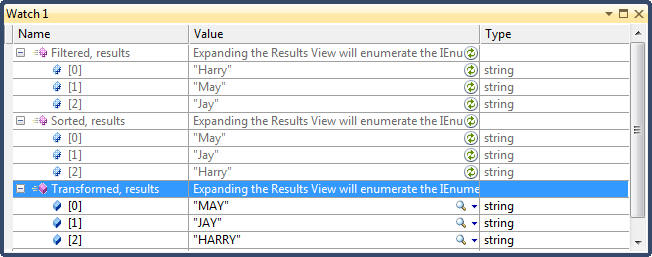
    var Filtered = names.Where((string name) => name.Contains("a"));
    var Sorted = Filtered.OrderBy((string name) => name.Length);
    var Transformed = Sorted.Select((string name) => name.ToUpper());

    // Note the output of each intermediate step. Output of 'Transformed' query
    // is the same as in the previous example

    // Output
    //  Harry
    //  May
    //  Jay
    PrintCollection(Filtered);

    // Output
    //  May
    //  Jay
    //  Harry
    PrintCollection(Sorted);

    // Output
    //  MAY
    //  JAY
    //  HARRY
    PrintCollection(Transformed);
}
Note the following about Lambda expressions
For example, this is how Enumerable.Where is implemented, exception handling aside:
public static IEnumerable<TSource> Where<TSource>(this IEnumerable<TSource> source, Func<TSource, bool> predicate)
{
    foreach (TSource element in source)
        if (predicate(element))
            yield return element;
}
string[] names = { "Tom", "Dick", "Harry", "May", "Jay" };
var v = names.Where( (string name) => name.Contains("a") );
The standard query operators utilize generic Func delegates. Func is a family of general-purpose generic delegates used to encapsulate a methods that take one or more parameters and returns a value. Func is defined with the following intent: The type arguments in Func appear in the same order they do in lambda expressions. Hence:
The original ordering of elements within an input sequence is important in LINQ. Some query operators rely on this behaviour such as Take, Skip and Reverse:
public void FluentQuery_NaturalOrdering()
{
    // Create an input sequence
    int[] numbers = { 1, 2, 3, 4, 5, 6 };

    // Take the first x elements
    var vTake = numbers.Take<int>(3);
    PrintCollection(vTake);

    // Skip the first x elements
    var vSkip = numbers.Skip(3);
    PrintCollection(vSkip);

    // Generate a reversed sequence. The original input sequence is not affected
    var vReverse = numbers.Reverse();
    PrintCollection(vReverse);
    PrintCollection(numbers);
}
Not all query operators return a sequence. Query operators that do not return a sequence must appear as the last operator in a query.
public void FluentQuery_DoesNotReturnSequence()
{
    // Create input sequence
    int[] numbers = { 1, 2, 3, 4, 5, 6, 7, 8 };

    // Element operators
    int nFirst = numbers.First();
    int nLast = numbers.Last();

    // Aggregation operators
    int nCount = numbers.Count();
    int nMin = numbers.Min();

    // Quantifier operators
    bool bNonEmpty = numbers.Any();
    bool bHasEvenNumbers = numbers.Any((int n) => n % 2 == 0);
}
Query expressions are C# syntactic shortcut for writing LINQ queries. Query expressions always start with a from clause and end with either select or group. The from clause declares a range variable (in this case, name) which you can think of as traversing the input sequence (query expressions can also introduce range variables using let, into and additional from clauses). The following shows the example in Chaining Query Operators rewritten using query expressions:
public void QueryExpression_Chaining()
{
    // Create input sequence
    string[] names = { "Tom", "Dick", "Harry", "May", "Jay" };

    // Same logic as FluentQuery_Chaining() method. The 'name' identifier following the from
    // keyword is called a 'range variable' and it refers to the current element in the input
    // sequence. Note that while the range variable appears in every clause (from, where, orderby,
    // and select), the variable enumerates over a different sequence with each clause. This
   // becomes clear if you look at the fluent syntax in FluentQuery_Chaining() method.
    var final = from name in names
                where name.Contains("a")    // Filter
                orderby name.Length         // Sort
                select name.ToUpper();      // Project

    // Output:
    //  MAY
    //  JAY
    //  HARRY
    PrintCollection(final);
}
The following table helps decide when to use query syntax vs. fluent syntax.
| Scenario | What to Use |
|
Query Syntax. |
| Simple use of Where, OrderBy, and Select. | Either syntax works well. |
| Queries that comprise a single operator. | Fluent syntax (shorter and less cluttered.) |
|
any operator outside of the following: Where, Select, SelectMany OrderBy, ThenBy, OrderByDescending, ThenByDescending GroupBy, Join, GroupJoin |
Fluent syntax. |
You can mix query syntax and fluent syntax. The only restriction is that each query-syntax component must be complete (i.e., start with a from clause and end with a select or group clause):
public void QueryExpressionMixedWithFluentSyntax()
{
    // Create input sequence
    string[] names = { "Tom", "Dick", "Harry", "May", "Jay" };

    // Count the number of names containing the letter 'a'
    int nCount1 = (from name in names where name.Contains('a') select name).Count();    // Mixed
    int nCount2 = names.Where((name) => name.Contains('a')).Count();                    // Fluent-only

    // Get the first name in alphabatical order
    string firstName1 = (from name in names orderby name select name).First();
    string firstName2 = names.OrderBy((name) => name).First();
}
A very important feature of most query operators is that they execute not when constructed, but when enumerated. This is called lazy or deferred execution. Deferred execution is important because it decouples query construction from query execution. This allows you to construct a query in several steps.
public void DeferredExecution()
{
    // Create an input sequence
    var lstNumbers = new List<int>() { 1, 2, 3 };

    // Create a query on the input sequence;
    IEnumerable<int> lst10Times = from number in lstNumbers select number * 10;

    // Sneak another element in
    lstNumbers.Add(4);

    // lst10Times is evaluated when enumerated and when constructed. This means that
    // the extra number sneaked in after the query was constructed is included in the
    // result.
    PrintCollection(lst10Times);
}
All standard query operators provide deferred execution, with the following exceptions which cause immediate query execution:
The following example illustrates:
public void ImmediateExecution()
{
    // Create an input sequence
    var lstNumbers = new List<int>() { 1, 2, 3 };

    // Create a query on the input sequence. Gets executed immediately
    int nCount = (from number in lstNumbers select number).Count();     // Count = 3

    // Add another element
    lstNumbers.Add(4);

    // Create a query on the input sequence. Gets executed immediately
    nCount = (from number in lstNumbers select number).Count();         // Count = 4
}
Deferred execution is due to the use of yield return in the implementation of query operators. For example, here's how Select query operator is implemented. Note the use of yield return:
public static IEnumerable<TResult> Select<TSource, TResult>(this IEnumerable<TSource> inputSequence, Func<TSource, TResult> selector)
{
    foreach (TSource element in inputSequence)
        yield return selector(element);
}
Deferred execution means that a query is evaluated not on construction, but on enumeration. Deferred execution also means that a query is reevaluated when you re-enumerate:
public void DeferredExecutionWithReevaluation()
{
    // Create an input sequence
    var lstNumbers = new List<int>() { 1, 2, 3 };

    // Create a query on the input sequence. query is evaluated on enumeration
    // PrintCollection prints 1, 2, 3
    IEnumerable<int> query = from number in lstNumbers select number;
    PrintCollection(query);

    // query is re-evaluated on enumeration. Since lstNumbers is now empty, PrintCollection
    // prints nothing
    lstNumbers.Clear();
    PrintCollection(query);
}
Reevaluation is sometimes disadvantageous:
You prevent reevaluation by immediately executing the query. Just call a conversion operator, such as ToArray() or ToList().
A captured variable is a local variable declared at the same scope as a lambda expression. If the query’s lambda expressions reference local variables, these local variables are subject to captured variable semantics. This means that if you later change their value, the query changes as well:
public void CapturedVariables()
{
    // Create input sequence
    int[] numbers = { 1, 2, 3 };

    // nFactor is a captured variable!
    int nFactor = 10;

    // Create a query that uses a captured variables
    var query = from number in numbers select number * nFactor;

    // Change the captured variables (query not evaluated yet)
    nFactor = 100;

    // Now evaluate the query by enumerating it. Prints 100, 200, 300.
    PrintCollection(query);
}
This is a common trap when building a query with a foreach loop:
public void CapturedVariables_Trap()
{
    // Create input sequence
    string msg = "Statement with lots of vowels";

    // Remove all vowels from the input sequence by using multiple filters.
    // Approach works but is ineffective as the output sequence is passed
    // to the next filter multiple times
    IEnumerable<char> query1 = msg.Where( c => c != 'a' );
    query1 = query1.Where( c => c != 'e' );
    query1 = query1.Where(c => c != 'i');
    query1 = query1.Where(c => c != 'o');
    query1 = query1.Where(c => c != 'u');
    WriteCollection(query1);        // Output: Sttmnt wth lts f vwls

    // Remove all vowels from the input sequence by using a foreach loop
    // Approach does not work because the compiler scopes the iteration
    // variable in the foreach loop as if it was declared outside the loop
    // This means that the same variables (the iteration variable) is updated
    // repeatedly so each lambda expressions captures the same variable producing
    // the same effect when we updated nFactor in the previous example.
    // So when we enumerate the query, all lambda expressions reference that
    // single variable's current value which is 'u'.
    IEnumerable<char> query2 = "Statement with lots of vowels";
    foreach (char vowel in "aeiou")
        query2 = query2.Where(c => c != vowel);
    WriteCollection(query2);        // Output: Statement with lots of vowels

    // This problem is solved by ASSIGNING THE LOOP VARIABLE TO ANOTHER VARIABLE
    // DECLARED INSIDE THE STATEMENT BLOCK
    IEnumerable<char> query3 = "Statement with lots of vowels";
    foreach (char vowel in "aeiou")
    {
        // Force a fresh variables to be used in each iteration
        char temp = vowel;
        query3 = query3.Where(c => c != temp);
    }
    WriteCollection(query3);        // Output: Sttmnt wth lts f vwls
}

private void WriteCollection<T>(IEnumerable<T> collection)
{
    Trace.WriteLine("");
    foreach (T t in collection)
        Trace.Write(t.ToString());
}
A subquery is a query contained within another query's lambda expression. The following shows an example of a subquery:
public void Subquery()
{
    // Input sequence is an array of arrays
    int[][] data = {
                    new int[] {3,4,5},
                    new int[] {1,2},
                    new int[] {5,6,7},
                    new int[] {1,0,2,3,4}
                    };


    // Query to order sequences by their average
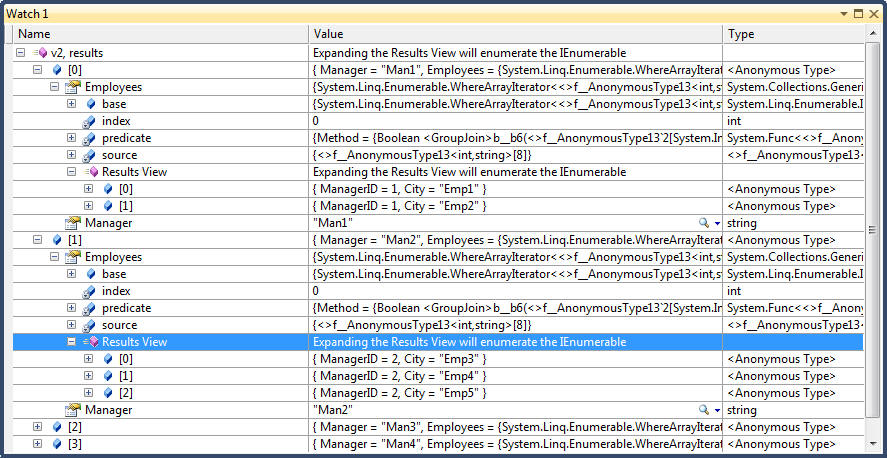
    var v = data.OrderByDescending(input => input.Average());
}
Subqueries are allowed because you can use any valid C# expression on the right-hand side of a lambda. Note that the subquery executes when required to feed the outer query. In our example, subquery input.Average() executes for every input.
There are three strategies for building complex LINQ queries. All are chaining strategies and produce identical results:
We showed earlier that a fluent query can be built progressively:
public void FluentQuery_ProgressiveChaining()
{
    // Create input sequence
    string[] names = { "Tom", "Dick", "Harry", "May", "Jay" };

    // 'Transformed' is compositionally identical to 'final' in the previous example
    var Filtered 	  = names.Where((string name) => name.Contains("a"));
    var Sorted 	  = Filtered.OrderBy((string name) => name.Length);
    var Transformed = Sorted.Select((string name) => name.ToUpper());
}
There are a few benefits to writing queries progressively:
public void ProgressiveQueryBuilding()
{
    // Create input sequence
    string[] names = { "John", "Paul", "Ringo", "George" };

    // Remove vowels from all names
    var v = from name in names select name.Replace("a", "");
    v = from name in v select name.Replace("o", "");
    v = from name in v select name.Replace("u", "");
    v = from name in v select name.Replace("i", "");
    v = from name in v select name.Replace("e", "");
    v.OrderBy(n => n);
    PrintCollection(v);

    // Remove vowels from all names
    var v2 = from name in names
                select name.Replace("a", "").
                Replace("o", "").
                Replace("u", "").
                Replace("i", "").
                Replace("e", "");
    v2.OrderBy(n => n);
    PrintCollection(v2);
}

Output from both queries:

Jhn
Pl
Rng
Grg
The into keyword is interpreted by query expressions in two ways: To indicate a query continuation or a GroupJoin. This section discusses using into for query continuation. The into keyword lets you continue a query after a projection and is a short cut for progressively querying. The only place you can use into is after select or group clauses. into restarts a query, allowing you to introduce fresh where, orderby and select clauses:
public void UsingInto()
{
    // Input sequence is an array of sequences
    int[][] data = new int[][]
                        {
                            new int[] {3,4,5},
                            new int[] {5,5,5},
                            new int[] {3,2,5,4}
                        };

    // Get sequences whose average is <= 4
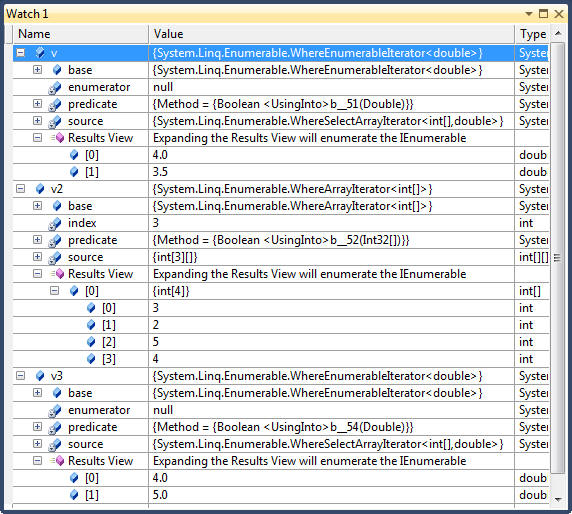
    double dThreshold = 4.0;
    var v = data.
                Select(input => input.Average()).
                Where(avg => avg <= dThreshold);

    // Cannot translate above query directly using query expression because the select
    // clause must come afterthe where clause. Note that this query ends up selecting
    // a sequence rather than an average
    var v2 = from input in data where input.Average() < dThreshold select input;

    // Using into gives same result as v
    var v3 = from input in data select input.Average()
                into average
                where average >= dThreshold select average;
}
Note that all query variables are out of scope following an into keyword. The following does not compile:
var query = from input in data select input.Average()
            into average
            where average < input.First();      // only average is visible. 'input' is not in scope
For example, consider the following query:
IEnumerable<string> query = from n in names
			 select n.Replace("a", "").Replace("e", "").Replace("i", "").Replace("o", "").Replace("u", "");
query = from n in query where n.Length > 2 orderby n select n;
Reformulated in wrapped form, it’s the following:
var query = from n1 in
		(from n2 in names
		select n2.Replace("a", "").Replace("e", "").Replace("i", "")
		.Replace("o", "").Replace("u", "")
		)
	   where n1.Length > 2
	   orderby n1
	   select n1;
All previous select clauses have projected scalar element types. With C# object initializers and anonymous types you can project into more complex types. Recall that with anonymous types, the complier creates a type less class with fields that match the structure of our projection, unlike object initializers where you need to explicitly create a class with required fields:
public void CompositionStrategy_AnonymousTypes()
{
    // Create an input sequence
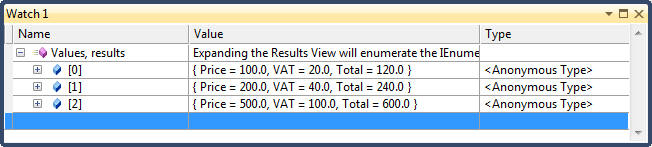
    var lstNumbers = new List<double>() { 100.0, 200.0, 500.0 };

    // Create a query on the input sequence;
    var Values = from number in lstNumbers select new { Price = number, VAT = number * 0.20, Total = number * 1.20 };

    // Enumerate query

    // Output results:
    //    Price = £100.00, VAT = £20.00, Total = £120.00
    //    Price = £200.00, VAT = £40.00, Total = £240.00
    //    Price = £500.00, VAT = £100.00, Total = £600.00
    foreach (var v in Values)
        Trace.WriteLine(string.Format("Price = {0:C}, VAT = {1:C}, Total = {2:C}", v.Price, v.VAT, v.Total));
}
The let keyword introduces a new variable alongside the range variable. let accomplishes two things:
Note the following about let keyword:
public void CompositionStrategy_Let()
{
    // Create input sequence
    string[] names = { "Altogether", "AOUIE", "Sometime", "UnConditional", "Evolutionary" };

    //Extract vowles
    var query = from name in names
            let NoAs = name.ToLower().Replace("a", "")
            let NoOs = name.ToLower().Replace("o", "")
            let NoUs = name.ToLower().Replace("u", "")
            let NoIs = name.ToLower().Replace("i", "")
            let NoEs = name.ToLower().Replace("e", "")
            let NoVowels = name.ToLower().Replace("a", "").Replace("o", "").Replace("u", "").Replace("i", "").Replace("e", "")
            select new {Name = name, NoA = NoAs, NoU = NoUs, NoO = NoOs, NoI = NoIs, NoE = NoEs, NoAOUEI = NoVowels};

    // Output
    //    Original: Altogether, A: ltogether, U: altogether, O: altgether, I: altogether, E: altogthr, AUOIE: ltgthr
    //    Original: AOUIE, A: ouie, U: aoie, O: auie, I: aoue, E: aoui, AUOIE:
    //    Original: Sometime, A: sometime, U: sometime, O: smetime, I: sometme, E: somtim, AUOIE: smtm
    //    Original: UnConditional, A: unconditionl, U: nconditional, O: uncnditinal, I: uncondtonal, E: unconditional, AUOIE: ncndtnl
    //    Original: Evolutionary, A: evolutionry, U: evoltionary, O: evlutinary, I: evolutonary, E: volutionary, AUOIE: vltnry
    foreach (var v in query)
        Trace.WriteLine(string.Format("Original: {0}, A: {1}, U: {2}, O: {3}, I: {4}, E: {5}, AUOIE: {6}",
                        new string[] {v.Name, v.NoA, v.NoU, v.NoO, v.NoI, v.NoE, v.NoAOUEI}));
}
LINQ provides two parallel architectures
A query can include both interpreted and local operators. A typical pattern is to have the local operators on the outside and the interpreted components on the inside; in other words, the interpreted queries feed the local queries. This pattern works well with LINQ-to-database queries. AsEnumerable() method can act as a bridge between interpreted and local queries. Its purpose is to cast an IQueryable<T> sequence to IEnumerable<T>, forcing subsequent query operators to bind to Enumerable operators instead of Queryable operators. This causes the remainder of the query to execute locally:
var query = dataContext.MyTable.Where( field => field.ID > 100) // Interpreted query runs remotely on database
            .AsEnumerable()                                     // Interpreted to local bridge
            .OrderBy( field => field.ID)                        // Local query runs locally
An alternative to calling AsEnumerable is to call ToArray or ToList. The advantage of AsEnumerable is that it doesn’t force immediate query execution, nor does it create any storage structure.
All examples in this section uses the following input collection
string[] names = { "Tom", "Dick", "Harry", "May", "Jay" };
The standard query operators fall into three categories:
| Sequence à Sequence | |
| Filtering | Where, Take, TakeWhile, Skip, SkipWhile, Distinct |
| Projecting | Select, SelectMany |
| Joining | Join, GroupJoin |
| Ordering | OrderBy, ThenBy, Reverse |
| Grouping | GroupBy |
| Set Operators | Concat, Union, Intersect, Except |
| Zip Operator | Zip |
| Conversion - Import | OfType, Cast |
| Conversion - Export | ToList, ToArray, ToDictionary, ToLookup, AsEnumerable, AsQueryable |
| Sequence à Element or Scalar | |
| Element | First, FirstOrDefault, Last, LastOrDefault, Single, SingleOrDefault, ElementAt, ElementAtOrDefault, DefaultIfEmpty |
| Aggregation | Aggregate, Average, Count, LongCount, Sum, Max, Min |
| Quantifiers | All, Any, Contains, SequenceEqual |
| Void à Sequence | |
| Generation | Empty, Range, Repeat |
public void Filtering()
{
    string[] names = { "Tom", "Dick", "Harry", "Mary", "Jay" };

    // Where returns elements from the input sequence tht staisfy a given predicate
    // Result: Harry, Mary, Jay
    var v1 = names.Where((name) => name.EndsWith("y"));

    // A where clause can appear multiple times and can be interspersed with let
    // Result: // HARRAY, MARRY
    var v2 = from name in names
                where name.Length > 3
                let u = name.ToUpper()
                where u.EndsWith("Y")
                select u;

    // Where's predicate can accept a second optional argument of type int which represents
    // the index of each element in the input sequence
    // Result: Tom, Harry, Jay
    var v3 = names.Where( (name, index) => index % 2 == 0);  // Select items whose index is even

    // Take method takes the first N elements, while Skip method skips the first N elements
    // Skip followed by Take allows you to return a specific range, say items 100-110 in an
    // input collection
    IEnumerable<int> ZeroToThousand = Enumerable.Range(0, 1000);
    var v4 = from n in ZeroToThousand.Skip(101).Take(10) select n;            // 101 ... 110
    var v5 = from n in ZeroToThousand.
                    SkipWhile(n => n <= 100).TakeWhile(n => n <= 110) select n;  // 101 ... 110
}
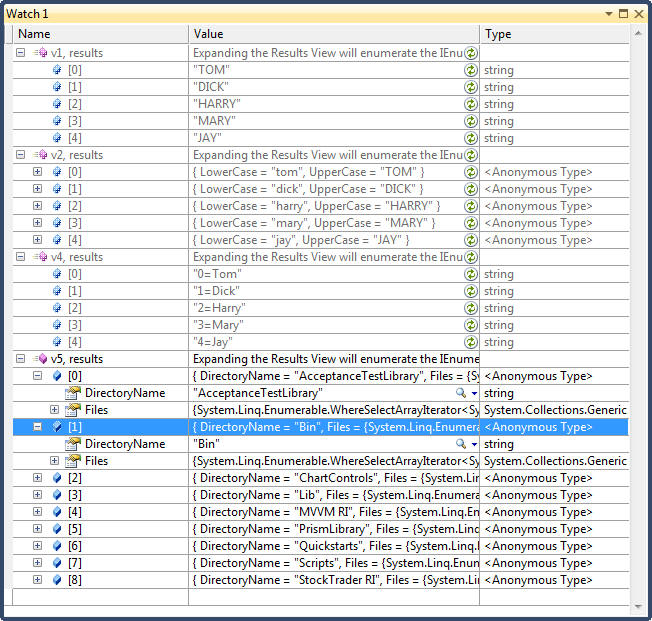
public void Projecting()
{
    string[] names = { "Tom", "Dick", "Harry", "Mary", "Jay" };

    // With Select you always get the same number of elements you started with.
    // TOM, DICK, HARRAY, MAY, JAY
    var v1 = from name in names select name.ToUpper();

    // Select is often used to project to anonymous types
    var v2 = from name in names select new { LowerCase = name.ToLower(), UpperCase = name.ToUpper() };

    // Select with no transformation is used with query syntax to satisfy the requirement
    // that the query must end in a select or gorup clause
    var v3 = from f in FontFamily.Families
             where f.IsStyleAvailable(FontStyle.Strikeout)
             select f;

    // Select accepts an optional int argument that acts as the index of each element
    // in the input sequence
    // Result: "0=Tom", "1=Dick" ...
    var v4 = names.Select((name, index) => index + "=" + name);

    // You can nest a subquery in a select clause to build an object hierarchy
    // The folloiwng returns a collection of files under each directory  in d:\Prsim4
    // Note that a subquery within a select causes double-deferred execution. In the example
    // below, the files do not get projected until an inner foreach enumerates.
    DirectoryInfo[] dirs = new DirectoryInfo(@"D:\Prism4").GetDirectories();
    var v5 = from d in dirs
                select new
                {
                    DirectoryName = d.Name,
                    Files = from file in d.GetFiles() select file.FullName // correlated query!
                };
}
public void Projecting_Subqueries()
{
    // Subquery projections can be used in LINQ-to-SQL to do the work of SQL-style joins.
    // This style of query is ideally suited to interpreted queries. The outer query and
    // subquery are processed as a unit, avoiding unnecessary round-tripping. With local
    // queries, however, it’s inefficient because every combination of outer and inner
    // elements must be enumerated to get the few matching combinations. A better choice
    // for local queries is Join or GroupJoin, described in the following sections.
    var query = from c in dataContext.Customers
        select new {
                    c.Name,
                    Purchases = from p in dataContext.Purchases
                                where p.Price > 1000
                                select new { p.Description, p.Price }
                    };

    foreach (var purchase in query)
    {
        Console.WriteLine ("Customer: " + purchase.Name);
        foreach (var detail in purchase.Purchases)
        Console.WriteLine ("  - $$$: " + purchase.Price);
    }
}
public void Project_SelectMany()
{
    // Recall that select yields one output element for each input element. SelectMany, in contrast,
    // yields 0..n output elements for each input element. The 0..n output elements come from a
    // child sequence that the lambda expression must emit. Therefore, SelectMany is used to
    // 1. Expand child sequences
    // 2. Flatten nested collections
    // 3. Join two collections into a flat output sequence
    // The key point is that the lambda expression must emit a child sequencer per input element

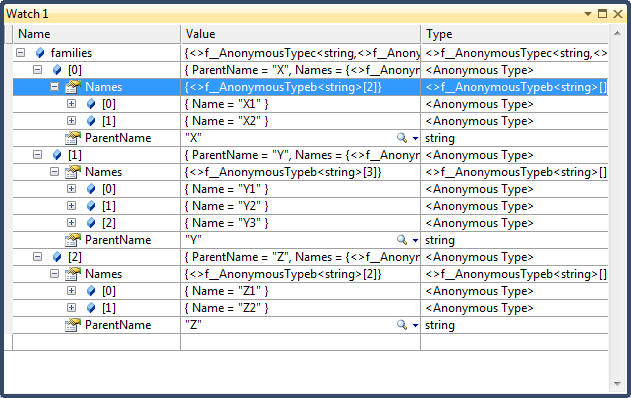
    // Input collection: A collection of parents with children
    // See Watch window 1
    var families = new[] {
        new {ParentName = "X", Names = new[] { new {Name="X1"}, new {Name = "X2"}}},
        new {ParentName = "Y", Names = new[] { new {Name="Y1"}, new {Name = "Y2"}, new {Name = "Y3"}}},
        new {ParentName = "Z", Names = new[] { new {Name="Z1"}, new {Name = "Z2"}}},
    };

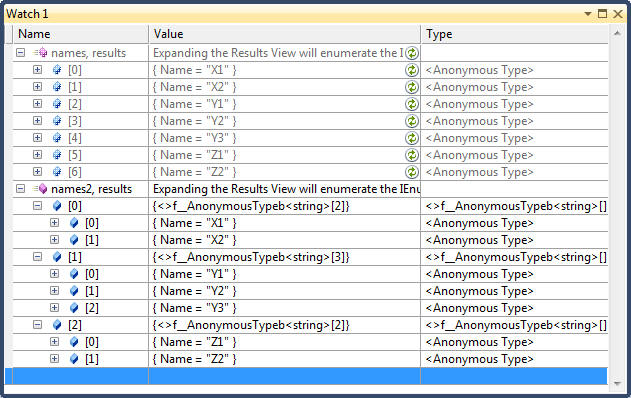
    // Result: X1 X2 Y1 Y2 Y3 Z1 Z2
    // See Watch window 2
    var names = families.SelectMany(v => v.Names);
    foreach (var v in names)
        Trace.WriteLine(v.Name);

    // Result: X1 X2 Y1 Y2 Y3 Z1 Z2
    // See Watch window 2
    // Note use of a nested foreach statement
    var names2 = families.Select(v => v.Names);
    foreach( var v1 in names2)
    {
        foreach (var v2 in v1)
            Trace.WriteLine(v2.Name);
    }

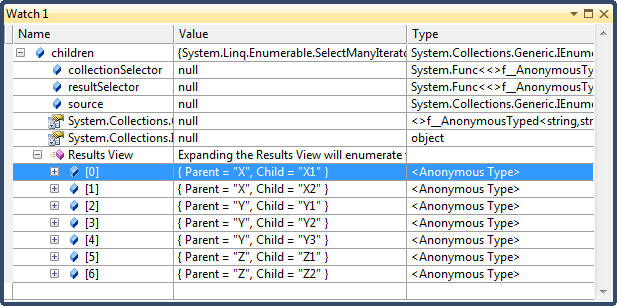
    // SelectMany is supported in query syntax by having an additional generator -
    // i.e., an additional from clause. In the example below, child is the new range
    // variable and family is the outer range variable. Note that the outer range
    // variable remains in scope until the query ends or eaches an into clause
    // See Watch window 3
    var children = from family in families
                    from child in family.Names
                    select new { Parent = family.ParentName, Child = child.Name };
}
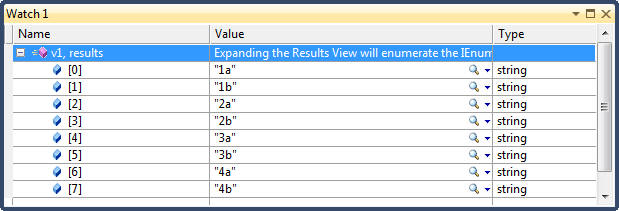
public void JoiningWithSelectMany()
{
    // SelectMany can be used to join two sequences to perform a CROSS JOIN
    int[] numbers = { 1, 2, 3, 4 };
    string[] letters = { "a", "b" };
    var v1 = from number in numbers
                from letter in letters
                select number.ToString() + letter;
}
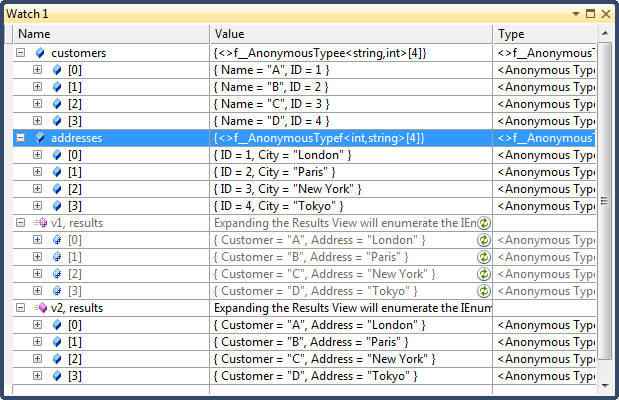
Join and GroupJoin combine two input sequences into a single output sequence. Join emits flat output while GroupJoin emits hierarchical output. Join and GroupJoin offer the equivalent of inner and left outer joins only. Cross joins and non-equi joins must be performed with Select/SelectMany:
public void Join()
{
    var customers = new[] {  new {Name="A", ID = 1},
                            new {Name="B", ID = 2},
                            new {Name="C", ID = 3},
                            new {Name="D", ID = 4}};

    var addresses = new[] { new {ID = 1, City = "London"},
                            new {ID = 2, City = "Paris"},
                            new {ID = 3, City = "New York"},
                            new {ID = 4, City = "Tokyo"}};

    // Join performs an inner join (customers without an address are excluded)
    // You can swap the outer (customers) and inner (addresses) sequences and
    // still get the same result. You can also add further join clauses to the
    // same query. Query syntax is usually preferable when joining; it’s less fiddly
    // than fluent syntax
    var v1 = from customer in customers
                join address in addresses on customer.ID equals address.ID
                select new { Customer = customer.Name, Address = address.City };

    // Same query as above written using SelectMany. Although both queries yield the
    // same results, the Join query is considerably faster because its implementation in
    // Enumerable preloads the inner collection into a keyed lookup.
    var v2 = from customer in customers
                from address in addresses
                where customer.ID == address.ID
                select new { Customer = customer.Name, Address = address.City };
}
public void GroupJoin()
{
    // Group join does the same work as Join, but instead of emitting a flat result
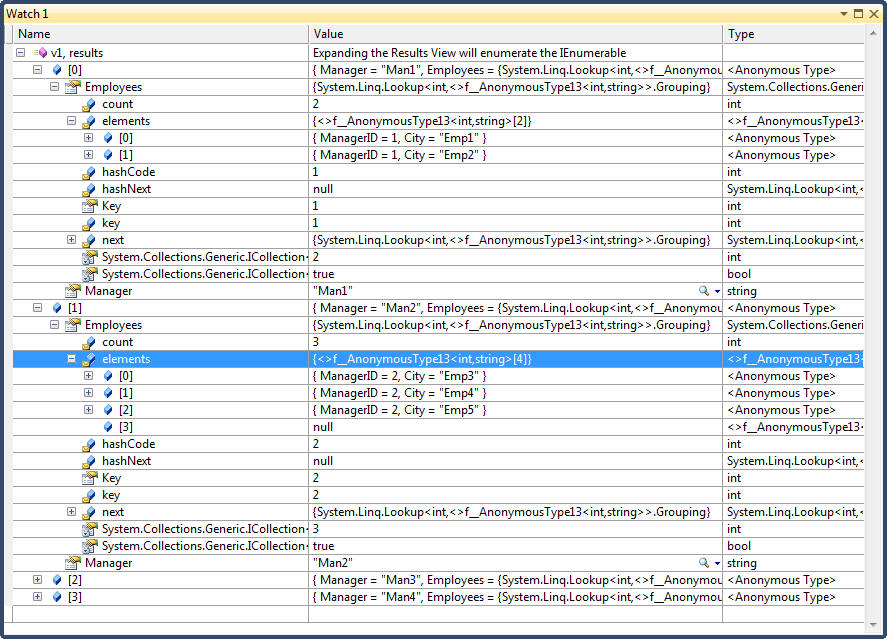
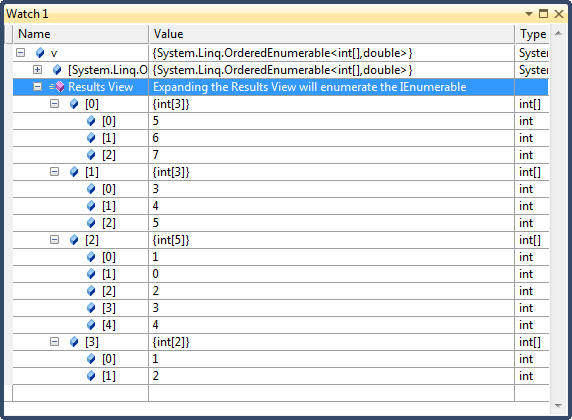
    // it emits a hierarchical result, GROUPED BY EACH OUTER ELEMENT. The query syntax
    // is the same as Join, but is followed by the into keyword.
    // An into clause translates to GroupJoin only when it appears directly after a join
    // clause. After a select or group clause, it means query continuation. The two uses
    // of the into keyword are quite different,

    // Input sequences
    var Managers = new[] {  new {Name="Man1", ManagerID = 1},
                            new {Name="Man2", ManagerID = 2},
                            new {Name="Man3", ManagerID = 3},
                            new {Name="Man4", ManagerID = 4}};

    var Employees = new[] { new {ManagerID = 1, City = "Emp1"},
                            new {ManagerID = 1, City = "Emp2"},
                            new {ManagerID = 2, City = "Emp3"},
                            new {ManagerID = 2, City = "Emp4"},
                            new {ManagerID = 2, City = "Emp5"},
                            new {ManagerID = 3, City = "Emp6"},
                            new {ManagerID = 3, City = "Emp7"},
                            new {ManagerID = 4, City = "Emp8"}};

    // By default group join does a left outer join
    var v1 = from manager in Managers
                join employee in Employees on manager.ManagerID equals employee.ManagerID
                into ManagerAndHisEmployees
                select new { Manager = manager.Name, Employees = ManagerAndHisEmployees };

    // The following is equivlant to the above query
    var v2 = from manager in Managers
                select new
                {
                    Manager = manager.Name,
                    Employees = from employee in Employees where employee.ManagerID == manager.ManagerID select employee
                };
}