This document provides guidelines for implementing an ADO.NET-based data access layer in a multi-tier .NET application.
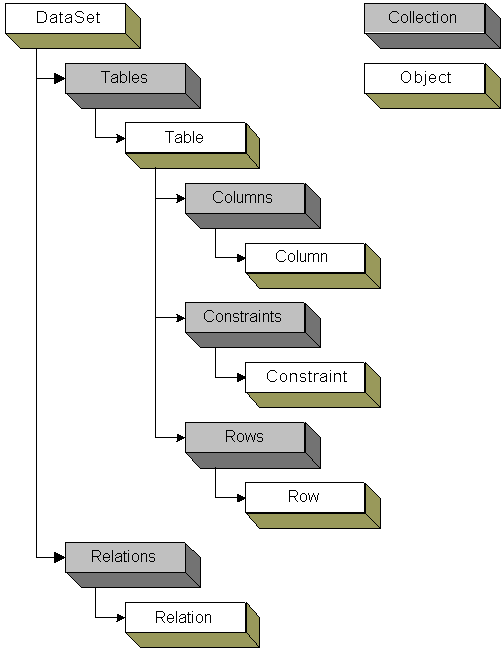
ADO.NET replaces the ADO Recordset with a combination of DataTable, DataSet, DataAdapter, and DataReader objects. A DataTable represents a collection of rows from a single table, hence it is similar to the ADO Recordset. A DataSet represents a collection of DataTable objects, together with the relationships and constraints that bind these tables together. In effect, a DataSet is an in-memory relational structure with built-in XML support.
One of the key characteristics of DataSet is that it has no knowledge of the underlying data source that might have been used to populate it. It is a disconnected, stand-alone entity used to represent a collection of data, and it can be passed from one component to another in a multi-tier application. It can also be serialized into XML stream making it ideally suited for data transfer between heterogeneous platforms.
ADO.NET uses the DataAdapter to channel data to and from the DataSet and the underlying data source. The DataAdapter also provides enhanced batch update features.
The following figure shows the full DataSet object model:
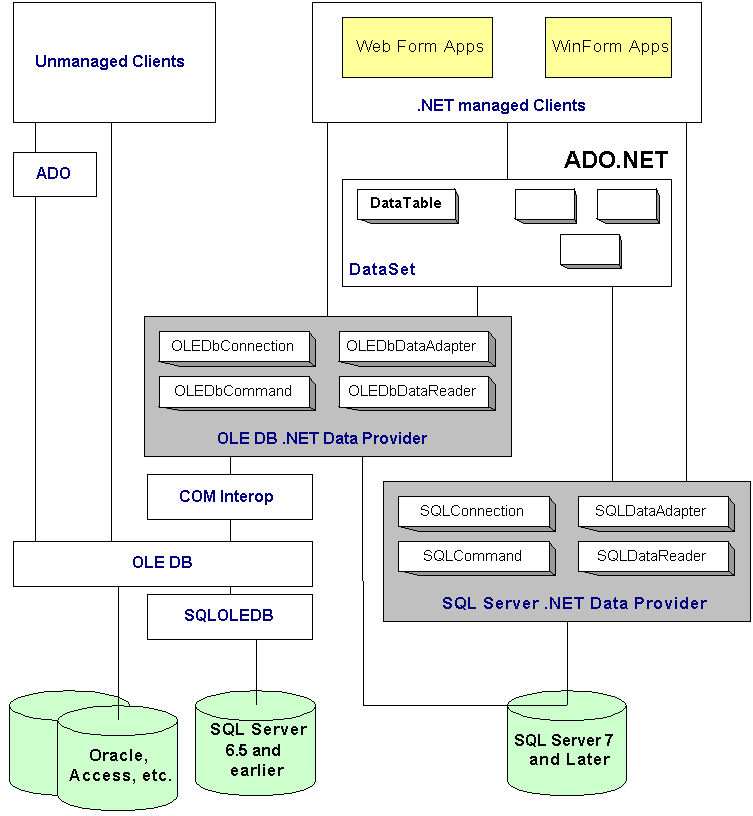
ADO.NET relies on the services of .NET Data providers. These provide access to the underlying data source and they comprise four key objects - Connection, Command, DataReader and DataAdapter. Currently ADO.NET ships with two providers:
Other .NET Data Provider in Beta include:
ADO.NET classes, structs and enums associated with each .NET provider are located in their own namespace:
Within its associated namespace, each provider provides an implementation of the Connection, Command, DataReader and DataAdapter objects.
If you are likely to target different data sources and want the freedom to move your code from one provider to another, consider using IDbConnection, IDbCommand, IDbDataReader and IDbDataAdapter interfaces in the System.Data namespace. All implementations of the Connection, Command, DataReader and DataAdapter objects must support these interfaces.
The following figure illustrates the data access stack, and how ADO.NET relates to other data access technologies including ADO and OLE DB:
You should use stored procedures instead of embedded SQL for a number of reasons:
With ADO.NET you can set property values either through constructor arguments or directly by setting properties. The choice is one of personal perference.
// Use constructor arguments to
configure command object
SqlCommand cmd = new SqlCommand( "select * from ordes", conn);
// User properties to configure command object
(functionally equivalent to the previous line)
SqlCommand cmd = new SqlCommand();
cmd.Connection = conn;
cmd.CommandText = "select * from ordes";
Database connections represent a critical, expensive, and limited resource, especially in Web applications. It is imperative that connections be managed appropriately because your approach will greatly affect the overall scalability of your application. You need to think carefully about where to store connection strings. You need a configurable and secure location.
When managing database connections and connection strings, you should aim to:
The following discusses these items in detail.
Database connection pooling enables an application to reuse an existing connection from a pool, instead of repeatedly establishing a new connection with the database. This technique can greatly affect the scalability of an application because a limited number of database connections can service a large number of clients. This technique also increases performance because the significant time required to establish a new connection can be avoided.
Use the connection pooling offered by this provider. It is a transaction-aware and efficient mechanism implemented internally by the provider within managed code. Pools are created on a per-process basis (hence cannot be shared across machines), and pools are not destroyed until the process ends. This form of connection pooling can be used transparently, but you should still be aware of how pools are managed and the various configuration options you can use to fine-tune connection pooling.
You can configure connection pooling by using a set of name-value pairs supplied by the connection string. For example, you can use the connection string to configure whether connection pooling is enabled/disabled (enabled by default), man and min pool sizes, and the amount of time that a queued request to open a connection can block. Note that when a connection is opened and a pool is created, multiple connections are added to the pool to bring the connection count to the configured minimum. Connections can be subsequently added to the pool up to the configured maximum pool size. When the maximum count is reached, new requests to open a connection are queued for a configurable duration.
// An example of a connection string
that configures the pool sizes
"Server=(local);Integrated Security=SSPI; Database=Northwind; Max Pool
Size=100; Min Pool Size = 5";
You will often need to monitor connection pooling, application performance, and SQL Server hardware to determine the optimum pool size. Establishing the maximum threshold is very important for large-scale systems that manage concurrent requests from thousands of clients.
If you establish a minimum pool size, you incur a small performance overhead while the pool is populated with new connections to bring the pool to the required minimum.
During development, it is recommended to reduce the default maximum pool size (currently 100) to help find any connection leaks.
When pooling with SQL Server .NET Data Provider, you need to be aware of the following:
SqlConnection cn1 = new SqlConnection("Database=Northwind");
cn1.open(); //
Pool A is created
SqlConnection cn2 = new SqlConnection("Database = Northwind");
// Spaces between name-value pairs
cn1.open(); //
Pool B is created
The OLE DB .NET Data Provider pools connections by using the underlying serviced of the OLE DB resource pooling. Here you have a number of options to configure, enable/disable resource pooling:
For more information on configuring OLE DB resource pooling see "OLE DB Programmer's reference" in MSDN
Under Windows DNA it was encouraged to disable OLE DB resource pooling and/or ODBC connection pooling and use COM+ object pooling as a technique to pool database connection. There are two primary reasons for this:
Because SQL Sever .NET Data Provider uses pooling internally, there is no need to develop your own object pooling mechanism. You can this avoid the complexities associated with manual transaction enlistment.
You can consider using COM+ object pooling if you are using the OLE DB .NET Data Provider to benefit from superior configuration and improved performance. If you develop a pooled object for this purpose, disable OLE DB resource pooling and automatic transaction enlistment. You must handle transaction enlistment within your pooled object implementation.
To monitor connection pooling, use SQL Server's Profiler tool, or Windows 2000 Performance Monitor.
In the Profile, select the Audit Login and Audit Logout events shown beneath Security Audit. In Performance Monitor, within SQL Server: General Statistics, select User Connections.
Although database connection pooling improves the overall scalability of you application, it means that you can no longer manage security at the database. This is because to support connection pooling, the connection strings must be identical. If you need to track database operations on a per-user basis, consider adding to each operation a parameter which you can pass the user identity and manually log user actions in the database.
Note that you should use Windows authentication when connecting to SQL Server because it provides a number of benefits:
Note that the TCP/IP network library must be used for SQL Server to gain configuration, performance, and scalability benefits.
Windows authentication requires a Windows account for database access. Although it might seem logical to use impersonation in the middle tier, you must avoid doing so because it defeats connection pooling and has a sever impact on application scalability.
To address this problem consider impersonating a number of Windows accounts (rather than the authenticated principal) with each account representing a particular role. For example, you can consider the following approach:
There are a variety of option to store connection strings, with each option offering varying degrees of flexibility and security. Although hard-coding a connection string in the code offers the best performance, file system caching ensures that the performance degradation associated with storing the connection string externally is negligible. The extra flexibility provided by an external connection string which supports administrator configuration is preferred in virtually all cases.
When choosing an approach for storing connection strings, the two most important considerations are security and ease of configuration, closely followed by performance.
The following subsections discuss different locations that can be used to storing connection strings, and they present the associated advantages and disadvantages of each approach.
You can use the <appSettings> element to store a database connection string in the custom settings section of an application configuration file. This element supports arbitrary key-value pairs:
<configuration>
<appSettings>
<add Key="MyConnectionString"
value="server=(local);Database=Northwind" />
</appSettings>
</configuration>
The OLE DB .NET Data Provider supports the Universal Data Link (UDL) file names in its connection string by specifying "FileName=MyName.udl" in the connection stirng. However, SQL Server .NET Data Provider does not support using UDL.
Using the Windows registry to store connection strings is not recommended due to deployment issues.
You can use a custom file to store the connection string. This technique offers no advantages and is not recommended
You can use object construction strings to have the database connection string passed automatically to your COM+ object. COM+ will call the object's Construct method immediately after instantiating the object, supplying the configured string. Note that this approach only works for serviced components. Consider it only if your managed components use other COM+ services such as distributed transaction support of object pooling.
Irrespective of the .NET data provider, you must always:
The connection is not returned to the pool until it is close through either Close of Dispose. You should also close a connection even if you detect it has entered a broken state. This ensures that it is returned to the pool and marked as invalid. The object pooler periodically scan the pool looking for invalid objects. To ensure that the connection is closed before the method returns, consider using one of the approaches illustrated in the two code samples below. The first uses a finally block, and the second uses a C# using statement.
// This approach uses a finally
block to close the connection. Can be used in C++ / C# / VB.NET
public void AccessTheDatabase()
{
Sqlconnection cn = new
SqlConnection(strConnectionString);
SqlCommand cmd = new
SqlCommand("spPlaceOrder", cn);
cmd.CommandType =
CommandType.StoredProcedure;
try
{
cn.Open();
cn.ExecuteNonQuery();
}
catch( Exception e)
{
// Handle and log error
}
finally
{
// This code
will be executed under normal and error conditions
cn.Close();
}
}
// This approach uses a C# using
statement to close the connection. Can be used in C++ / C# only.
// This approach can also be used to close other objects - for example,
SqlDataReader or OldDbDataReader.
public void AccessTheDatabase()
{
// "using" guarantees that
Dispose is called on the connection object, which will close the connection
using (Sqlconnection cn = new
SqlConnection(strConnectionString))
{
SqlCommand cmd
= new SqlCommand("spPlaceOrder", cn);
cmd.CommandType =
CommandType.StoredProcedure;
cn.Open();
cn.ExecuteNonQuery();
}
}
ADO.NET errors are generated and handled through the underlying structured exception handling support native to the .NET framework. Therefore, you handle ADO.NET errors in the same way you handle errors in your .NET application. Exceptions can be detected then handled using standard .NET exception handling mechanisms.
The .NET data providers translate database-specific error conditions into standard exception types, when should be handled in the data access code.
All .NET exception types are ultimately derived from the base Exception class in the System namespace. .NET data providers throw provider-specific exception types. For example, the SQL Server .NET Data Provider throws SqlException objects whenever SQL Server returns a database error. The following figure shows the .NET data provider exception hierarchy:
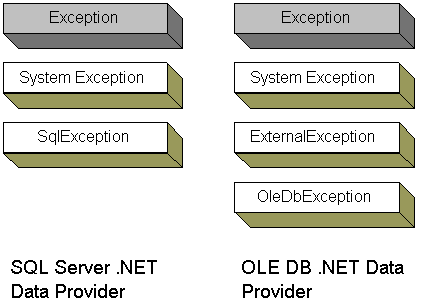
Note that OleDbException is derived from ExternalException, the base class for all COM interop exceptions. The ErrorCode property of this object stored the COM HRESULT generated by OLE DB.
Catch data access exceptions according to the provider being used. For example, when using the SQL Server .NET Data Provider, you should catch exceptions of type SqlException. Remember to order catch handles from most specific exception type to the least specific exception type.
try
{
// Data access code using the SQL
Server .NET Data Provider
}
catch( SqlException e) //
More specific
{
// Handle data exception condition. Log
details
LogException( e );
// Wrap current exception in a more
relevant outer exception and re-throw the new exception.
throw new DALException( "Appropriate error
message here", e );
}
catch(Exception
e) //
Less specific
{
// Handle generic exception conditions
throw e
}
finally
{
connection.Close();
}
T-SQL provides the RAISERROR function to generate custom errors and return them to the client. For ADO.NET data clients, the SQL Server .NET Data Provider intercepts these database errors and translates them into SqlError objects.
-- Using RAISERROR
...
RAISERRIR( "Unknown order ID: %s", 16, 1, @OrderID) --
Severity is 16
To avoid hard coding error messages, you can add your own messages to the sysmessages system table using the sp_addmessage system stored procedure. You can then reference the message by passing RAISERROR the message ID. Note that message IDs must be greater than 50,000.
Note that when using the sp_addmessage system stored procedure to add your own messages, you need to use the appropriate severity level. You must choose the error servility level carefully while being aware of the impact of each level. Error severity levels range from 0 to 25 and are used to indicate the type of problem that SQL Server 2000 has encountered
| Severity Level | Connection is closed | Generates SqlException | Meaning |
|---|---|---|---|
| <= 10 | No | No | Information message does not necessarily represent error conditions |
| 11-16 | No | Yes | Errors that can be corrected by the user - for example by retrying the data with amended input data |
| 17-19 | No | Yes | Resource or system errors |
| 20-25 | Yes | Yes | Fatal system errors (including hardware errors). Client's connection is terminated |
Note the following with respect to severity levels:
The section introduces a number of common data access scenarios, and for each one, provides details about the most high-performance and scalable solution in terms of ADO.NET data access code. This section covers the following scenarios:
In this scenario you want to retrieve a tabulated set of data and iterate through the set to perform certain operations. To help determine the most appropriate data access approach, consider whether you require the added flexibility of the disconnected DataSet object, or the raw performance offered by the SqlDataReader object, which is ideally suited to data presentation in business to consumer (B2C) Web applications.

You have the following options when you want to retrieve multiple rows from a data source:
The choice between the first two options is that of performance vs. functionality. The second option offers optimum performance, whereas the first option offers additional functionality and flexibility. Note also that the second option is optimized for Web applications that require optimized forward-only data access, whereas the first option is a disconnected structure suited to both Web and desktop (WinForm) scenarios.
The DataSet provides a relational view of the data that can optionally be manipulated as XML, and allows a disconnected cached copy of the data to be passed between application tiers and components. The SqlDataReader offers optimum performance because it avoids the performance and memory overhead associated with the creation of a DataSet. Remember that the creation of a DataSet object results in the creation of many sub-objects including DataTable, DataRow, and DataColumn - and the collection objects used as containers for these objects.
Use a DataSet populated by a SqlDataAdapter object when:
Use a SQlDataReader obtained by calling the ExecuteReader method of SqlCommand object when:
Use an XmlReader obtained by calling the ExecuteXmlReader method of SqlCommand object when:
In this scenario you want to retrieve a single row of data that contains a specified set of columns from a data source.
You have the following options when retrieving a single row of data. Note that both options avoid the unnecessary overhead of creating a result set on the server and a DataSet on the client:
Use the first option when you want to retrieve a single row from a multi-tier Web application where you have enabled connection pooling. Use the second option when you require metadata in addition to the data values, or when are not using connection pooling. With connection pooling disabled, SqlDataReader is a good option under all stress conditions.
When obtaining a SQlDataReader by calling the ExecuteReader method of SqlCommand object, use the CommandBehavior.SingleRow enumerated value when you know that your query will return a single row.
In this scenario you want to retrieve a single data item. For example, you might want to look up a certain product ID. In such scenarios, you will generally not want to incur the overhead associated with a DataSet or even a DataTable object.
You have the following options when retrieving a single item of data from a data source:
The ExecuteScalar method is designed for queries that only return a single value. It requires less code than any of the other two options. However, from a performance perspective, using a stored procedure output or return parameter offers consistent performance across low- and high-stress conditions.
Checking to see whether or not a row with a particular primary key exists, is a variation of Retrieving a Single Item scenario, in which a simple Boolean return is sufficient
You will often want to configure Internet applications to connect to a SQL Server through a firewall. For example, the DMZ which is used to isolate the front-end Web applications from internal networks, may wish to access the SQL Server through a firewall.
Connection to SQL Server through a firewall requires specific configuration of the firewall, client, and server. Use SQL Server's Client Network Utility and Server Network Utility programs to aid configuration.
Use the SQL Server TCP/IP network library to simplify configuration when connecting through a firewall - this is the SQL Server 2000 installation default. In addition to the configuration benefit, using TCP/IP library means that you:
Note that you must configure both the client and server computer for TCP/IP. And because most firewalls restrict the set of ports through which they allow traffic to flow, you must also give careful consideration to the port numbers that SQL Server uses.
Many applications may need to deal with binary data such as graphics, sound or even video files. From a storage perspective, they can all be thought of as lumps of binary data, typically referred to as Binary Large Objects, or BLOBs.
SQL Server provides the binary, varbinary, and image data types to store BLOBs. Despite the name, BLOBs can also refer to text-based data for which SQL Server provides the text and ntext data types. In general, for binary data less than 8Kb use the varbinary data type. For binary data exceeding this size, use image.
Improved BLOB support in SQL Server 2000, coupled with ADO.NET support for reading and writing BLOB data, makes storing BLOB data in the database a feasible approach. Storing BLOB data in the database offers a number of advantages:
There are basically two transaction programming models:
Before choosing a transaction model you should consider whether you really need them or not. Transactions are the single most expensive resource consumed by server applications, and they reduce scalability when used unnecessarily. Consider the following guidelines governing the use of transactions:
Use Manual transactions when:
Use automatic transactions when:
Avoid mixing transaction models. Use one or the other.
With manual transactions, you write code that uses the transaction support features of either ADO.NET in component code, or or T-SQL in stored procedures. In most cases, opt for controlling transactions in stored procedures, because this offers superior encapsulation, better maintenance since no components need to be recompiled and redeployed, and better performance since there are no network round trips.
The tradeoff for manual transactions against automatic transaction is that there is an extra burden on the programmer to enlist data resources with the transaction boundary and coordinating these data sources. There is no built-in support for distributed transactions and so it will be a lot of responsibility if you choose to control a distributed transaction manually - you will need to control every connection and resource enlistment, and provide implementation to maintain the ACID prosperities of the transaction.
ADO.NET supports a transaction object that you can use to start a new transaction and then explicitly determine whether it should be committed or aborted. The transaction object is obtained from the connection object:
// Begin a transaction
SqlTransaction tran = conn.BeginTransaction();
// Set the transaction in which the command executes
cmd.Transaction = tran;
Calling BeginTransaction() method does not mean that subsequent commands are issued in the context of a transaction. You must explicitly associate each command with a transaction by setting the Transaction property of the command. You can group multiple command objects with the same transaction object, thereby grouping multiple operations against the single database in a single transaction. Note that the default isolation level for ADO.NET transactions is Read Committed.
Controlling a transaction manually through ADO.NET results in less efficient locking as compared to using explicit transactions in stored procedures. The reason is that an ADO.NET manual transaction takes at least as many round trips to the database as there are operations to execute within the transaction, in addition to network trips that begin and end transactions. You hold locks while calls are sent back and forth between ADO.NET code and the database server. Obviously, this can seriously affect scalability.
Transactions are controlled using BEGIN TRANSACTION, END TRANSACTION, and ROLLBACK TRANSACTION. Transaction isolation level is controlled with SET TRANSACTION ISOLATION LEVEL statement. Note that a stored procedure can use SET XACT_ABORT ON to indicate to SQL Server that it should automatically rollback the transaction in case any of the statements fail to complete:
CREATE PROCEDURES P1
AS
-- Rollback transaction if any
statement fails to complete
SET XACT_ABORT ON
-- Begin transaction
BEGIN TRANSACTION
-- Do transaction operations here
...
-- Commit the transaction
COMMIT TRANSACTION
Running a transaction implemented in a stored procedure offers the best performance as it needs only a single network trip to the database. It also gives the flexibility of explicitly controlling transaction boundary.
Automatic transactions simplify the programming model because they do not require you to explicitly start or explicitly commit/abort a transaction. Their most significant advantage is that they automatically work with the DTC allowing a single transaction to span multiple resource managers. The caveat is that it pays a performance penalty due to DTC and COM interoperability overhead, and there is no support for nested transactions.
Only serviced component can use automatic transactions. To configure a class for automatic transactions:
ASP.NET pages, Web service methods, and .NET classes can configured to be transactional by setting a declarative transaction attribute.
ASP.NET
<@ Page Transaction="Required">
ASP.NET Web Services
<%@ WebSerivce Language="VB" Class="MyClass"
%>
<%@ assembly name="System.EnterpriseServices" %>
...
public Class MyClass
Inherits WebService
<WebMethod(TransactionOption :=
TransactionOption.RequiresNew)> Public Function Method1()
...
.NET Services Components
// C#
[Transaction(TransactionOption.Required)]
pubic class MyClass : ServiceComponent
{ ... }
Under COM+ 1.0 in Windows 2000, the transaction isolation level was Serialized. Under COM+ 1.5 in .NET, the transaction isolation level can be configured in the COM+ catalog on a per-component basis. The setting associated with the root component in the transaction determines the isolation level for the transaction. In addition, subcomponents that are part of the same transaction stream must not have a higher transaction level than that defined by the root component. If they do, an error will occur when the component is instantiated.
For .NET components, the Transaction attribute support the public Isolation property, which can be used to declaratively specify a particular isolation level:
[Transaction(TransactionOption:Supported, Isolation=TransactionIsolationLevel.ReadCommitted)]
public class Order : ServicedComponent
{
...
}
The outcome of an automatic transaction is governed by the state of one and only transaction abort flag, together with the consistent flags in the context of all transactional components, in a single transaction stream. Transaction outcome is determined at the point that the root component in the transaction stream is deactivated.
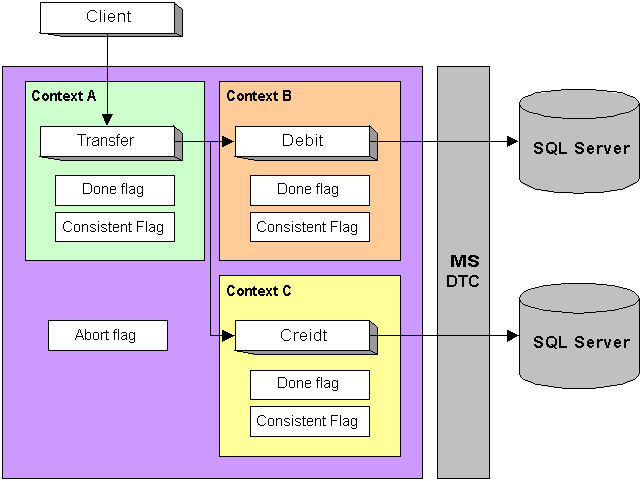
In this example, the outcome of the transaction is determined when the Transfer object is deactivated, and the client' s method call returns. If any of the consistent flags with any context are set to false or if the transaction abort flag is true, the underlying DTC transaction is aborted. Note that the state of the Done and Consistent Flags are changed by SetComplete and SetAbort. The Abort Flag is set to true only if any object is deactivated with its Consistent Flag set to False, i.e., the object called SetAbort then deactivated.
You can control transaction outcome in .NET components in one of two ways:
SQL Server errors with a severity greater than 10 result in the managed data provider throwing an exception of type SqlException. If your method catches and handles the exception, be use to either manually vote to abort the transaction, or for methods flagged as AutoComplete ensure that the exception is propagated. Failure to propagate the exception will result in the object not voting to abort the transaction despite the database error.
Note: If you have multiple catch statements, it is much easier if you call SetAbort once at the start of the method, and call SetComplete at the end of the try block. In this way you do not need to repeat the call to SetAbort in each catch block. The setting of the consistent flag determined by these methods has significance only when the method returns.
Paging through data is a common requirement in distributed applications. For example, the user might be presented with a huge list of books, but it might be prohibitive to display the entire list at once. The user will want to perform familiar activities on the data such as viewing the next or previous page of data, or jumping to the beginning or end of the list.
Options for data paging are:
The best option for paging data is dependent on the factors below:
Based on performance tests, the manual approach using stored procedures offers the best performance across a wide range of stress levels. However, as the manual approach performs its work on the database server, the server stress levels can become a significant issue if a large proportion of the site's functionality depends on data paging.. Therefore, always test all options against your specific requirements.
The purpose of SqlDataAdapter is to fill a DataSet with data from a database. Consider the following overloaded Fill method
public int Fill(
DataSet ds,
int nStartRecord,
// zero-based index of the start record
int maxRecords,
// Number of records stating from nstartRecord
string srcTable );
SqlDataAdapter executes the query and creates a DataSet and copies into it maxRecords of data starting from nStartRecord. Unneeded data is discarded, but this also means that a lot of unnecessary data could potentially be pulled across the network to the data access client - the primary drawback to this approach. So if you had 100,000 rows in your table and you wanted rows 99,950 to 100,000 (50 rows only), all remaining rows (99,950 rows) will be discarded. On the other hand, this overhead will be minimal for small result sets
The primary motivation behind this option is to gain access to server-side cursors, which are exposed through the ADO Recordset object. With a server-side cursor you can use the cursor to navigate to the required start location directly without having to pull all of the records across the network to the data access client.
Note that there are two primary drawbacks to this approach:
In this approach, data paging is implemented manually using stored procedures. For tables that contain stored procedures, this approach can be implemented easily. For tables without a unique key (and you should not have plenty of those!) the process is more complicated.
use SET ROWCOUNT statement to restrict the size of the result set, and use the unique key in a WHERE close to create a result set from a specific row.
CREATE PROCEDUREGetPagedProducts
@LastProductID int,
@PageSize int
AS
SET ROWCOUNT @PageSize
// Restricting size
SELECT *
FROM MYTABLE
WHERE ( standard search criteria) AND
( ProductID > @LastProductID
) // Specifying start
location
END
If the table though which you want to page does not contain a unique key, consider adding one by adding an identity column. This will you to implement the paging mechanism discussed previously.
It is still possible to implement effective paging solution for a table without a unique key as long as you can generate uniqueness by combining two or more fields that are part of the result set.
// The following assumes that combining Field 5 (F5) and
Field 6 (F6) generate a unique value
CREATE PROCEDURE GetPagedOrders
@LastKey char(40),
@PageSize int
AS
SET ROWCOUNT @PageSize
// Restricting size
SELECT F1, F2, ..., F5+F6 as KeyField
FROM MYTABLE
WHERE ( standard search criteria) AND
( F5+F6 > @LastKey
) // Specifying start
location
ORDER BY F5 ASC, F6 ASC
END
Note that the client maintains the last value of KeyField column returned by the stored procedure and plugs it back to the stored procedure to control paging through the table
Note that although manual implementation increases the strain placed on the database server, it avoid passing unnecessary data across the network. Depending on how much of the sites functionality involves data paging, performing manual paging on the server might affect the scalability of the application.