WCF and MSMQ
Summary
Basic Scenarios
WCF provides support for queuing by using Microsoft Message Queuing (MSMQ) as a
transport. WCF and MSMQ enable the following scenarios:
-
Loosely coupled applications
Sending applications can send messages to queues without having to know whether
the receiving application is available to process the message. The queue
provides processing independence that allows a sending application to send
messages to the queue at a rate that is not dependent on how fast the receiving
applications can process the messages. System availability is increased when
sending messages to a queue is not tightly coupled to processing the message.
-
Failure isolation
Applications sending or receiving messages to a queue can fail without affecting
each other. If, for example, the receiving application fails, the sending
application can continue to send messages to the queue. When the receiver is up
again, it can process the messages from the queue. Failure isolation increases
the overall reliability and availability of the system
-
Load Balancing
Sending applications can overwhelm receiving applications with messages. Queues
can manage mismatched message production and consumption rates so that a
receiver is not overwhelmed.
-
Disconnected operations
Sending, receiving, and processing operations can become disconnected when
communicating over high-latency networks or limited-availability networks.
Queues allow these operations to continue even when the endpoints are
disconnected. When the connection is re-established, the queue forwards messages
to the receiving application
Queuing Concepts
There is one important factor that differentiates between using a queued
transport versus a direct transport such as TCP or HTTP and that is isolation
between the service, the client and the transport. The nature of direct
transports using TCP and HTTP is such that if the service or the client were to
stop functioning, or if the network itself were to fail, communication stops
altogether. The service, the client and the network must be up and running at
the same time for the application to work. Queued transports, on the other hand,
provide isolation such that if the service or client were to fail or if
communication links between them were to fail, the client and service can
continue to function.
Queues capture and deliver messages exchanged between the communicating parties.
Queues are typically backed by some kind of a store which can be volatile or
durable. Queues store messages from a client on behalf of a service, and later
forward these messages to the service. The indirection provided by queues
ensures isolation of failure by either party, thus making it the preferred
communication mechanism for high availability systems and disconnected services.
The indirection comes with the cost of high latency. Latency is the time delay
between the time the client sends a message and the time it is received by the
service. This means that once a message has been sent, you don't know when that
message may be processed. Figure below illustrates a simple conceptual model of
queued communication:

The queue is really a distributed concept. In other words, a queue may be local
to either party or remote to both parties. Typically, the queue is local to the
service. In this configuration, the client cannot depend on connectivity to the
remote queue to be constantly available. Similarly, the queue must be available
independent of the availability of the service reading from the queue. A Queue
Manager manages a collection of queues. It is responsible for accepting messages
sent to its queues from other queue managers. It is also responsible for
managing connectivity to remote queues and transferring messages to those remote
queues. To ensure availability of queues in spite of client or service
application failures, the queue manager is typically run as an external service.
When a client sends a message to a queue, it addresses the message to the
Target
Queue, which is the queue managed by the service's Queue Manager. For the client
message to ultimately get to the Target queue, the Queue Manager on the client,
sends the message to a Transmission (or outgoing) Queue. The Transmission Queue
is a queue on the client side Queue Manager that stores messages for
transmission to the Target Queue. The Queue Manager then finds a path to the
Queue Manager that owns the Target Queue and transfers the message to it. To
ensure reliable communication, the Queue Managers implement some kind of a
reliable transfer protocol to ensure there is no data loss. The destination
Queue Manager accepts messages addressed to the Target Queues it owns and stores
the messages. The service makes requests to read from the Target Queue, at which
time, the queue manager then delivers the message to the destination
application. The following figure illustrates the communication between the 4
parties.
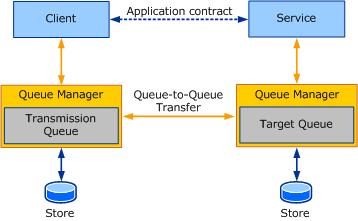
The Queue Manager provides the required isolation such that the sender and
receiver can independently fail without affecting actual communication. The
benefit of extra indirection provided by queues also enables multiple
application instances to read from the same queue, thus farming work among the
nodes to achieve higher throughput. Therefore it is not uncommon to see queues
being used to achieve higher scale and throughput requirements
Queues and Transactions
In transactional messaging, messages can be sent to the queue and received from
the queue under a transaction. Thus, if a message was sent in a transaction and
the transaction was rolled back, then, the outcome is as if the message was
never sent to the queue. Similarly if a message was received in a transaction
and the transaction was rolled back, then, the outcome is as if the message was
never received. The message remains in the queue to be read.
Because of
high latency, when we send a message we have no way of knowing how long it will
take to reach its Target Queue, nor do we know how long it will take for the
service to process the message. Because of this you don't want a single
transaction to be used to send a message, receive the message, and then process
the message. Doing this would create a transaction that would not be committed
for an indeterminate amount of time. When a client and service communicate
through a queue using a transaction there will be two transactions involved: one
on the client's side and one on the service's side.
-
Client-side transaction will do some processing and send
the message to the service. Outcome is as follows:
- Service-side will read and process message. Outcome is as
follows:
- Transaction committed: Message removed from Target queue.
- Transaction rolled back: Message places back in the Target queue.
Asynchronous communication using queues
Queues provide an asynchronous means of communication. Messages may remain in
the queue for a far longer time than the application intended. To avoid this,
the application can specify a Time To Live value on the message. This value
specifies how long the message should remain in the Transmission Queue. If this
time value is exceeded, and the message still has not been sent to the Target
Queue the message can be transferred to a Dead Letter Queue.
When the sender sends a message, the return from the send operation implies that
the message only made it to the Transmission Queue on the sender. As such, if
there is a failure in getting the message to the Target Queue, the sending
application cannot know about it immediately. To take note of such failures, the
failed message is transferred to a Dead Letter Queue.
Any error, such as messages failing to reach the Target Queue or the message's
Time To Live expired, must be processed separately. It is not uncommon,
therefore, for queued applications to write 2 sets of logic:
Dead Letter & Poison Message Queue Programming
Dead letter queues contain messages that failed to reach the Target Queue for
various reasons. The reasons may range from expired messages to connectivity
issues forbidding transfer of the message to the Target Queue.
Typically there is a Dead Letter Queue that is system wide that an application
can read messages from and determine what went wrong and take appropriate action
such as correcting the errors and sending the message again or simply taking
note of it.
After a message has made it to the Target Queue, the service may fail to process
the message repeatedly. For example, an application reading a message from the
queue under a transaction and updating a database may find that the database
connection is temporarily disconnected. In this case, the transaction would be
rolled back, and a new transaction would be created and the message would be
read from the queue again. A 2nd attempt may succeed or fail. In some cases,
depending on the cause of the error, the message may fail delivery to the
application repeatedly. In this case, the message is deemed as poison. Such
messages are moved to a Poison Queue which can be read by a poison handling
application.
WCF allows disconnected communication between client and service via queued
calls. In this pattern, the client posts a message to a queue and the service
processes the message at a later time. Such interaction is quite different
from the typical request/response pattern, and enables other possibilities
such as load-balancing, improved availability and, compensating work, to name
just a few.
WCF provides support for queued calls via the
NetMsmqBinding binding. Recall
that a binding describes how communication will take place: instead
of transporting a message over TCP or HTTP to a live service, WCF transports
the message to an MSMQ queue. Since the interaction with MSMQ is
encapsulated within the binding, there is nothing in the service or client
invocation code that indicates that the call is queued. The service and
client code look like any other WCF client and service.
There is no direct mapping between MSMQ and WCF messages. Instead, the
contract session mode determines how MSMQ and WCF messages map as follows:
There are a few key concepts relating to how queued calls are used with WCF.
Refer to the following diagram:

-
The client proxy is configured to use NetMsmqBinding. The client does not
send WCF messages to any particular service. Instead, the calls are
converted into MSMQ messages and are posted to the queue specified in the
endpoint's address.
-
One the service side, the host installs a queue listener. The queue
listener detects if there are messages in the queue, dequeues any existing
messages, and then invokes the appropriate service instance as if a call
from a client was being processed.
-
If the host is offline, messages will simply be pending in the queue. The
next time the host is up, messages will be forwarded to the service.
-
A queued call cannot possible return any meaningful values because no
service logic in invoked at the time the message is dispatched to the queue.
A call may even be processed only after the client has shut down. Similarly,
a call cannot return to the client any service-side exceptions as there might
not be a client to process the exception.
-
Queued calls are asynchronous from the client's perspective. The client
is only blocked for the briefest of time it takes to queue up the message.
All the client sees and interacts with is the queue, and not a service
endpoint. Calls are therefore, asynchronous and disconnected. Calls will
executed when the service reads the queue at some time in the future.
There are some caveats in WCF queued binding:
-
All service operations must be one-way because the queued binding provided by
default with WCF does not support duplex communication using queues.
-
Based on the queued binding, extra configuration outside of WCF will be
required. For example, the NetMsmqBinding shipped with WCF requires configuring
the bindings as well as minimal configuration steps to configure MSMQ..
NetMsmqBinding binding
The NetMsmqBinding is the binding provided in WCF for two WCF endpoints to
communicate using MSMQ. The binding therefore, exposes specific properties that
are MSMQ-specific. The NetMsmqBinding is a compact feature designed with the
optimal set of features that the majority of customers would find sufficient.
The NetMsmqBinding containsthe core queuing concepts discussed thus far in the
form of properties on the bindings. These properties in turn are used to
communicate to MSMQ how the messages get transferred and delivered.
ExactlyOnce and Durable properties
ExactlyOnce and Durable properties affect how messages are transferred between
queues:
-
ExactlyOnce: When set to
true, the queued channel will ensure that the message,
if delivered, will not be duplicated. It also ensures that the message is not
lost. But in the case that the message cannot be delivered or the message Time
To Live expired before the message could be delivered, the failed message along
with delivery failure reason will be recorded in a dead-letter queue. When set
to false, the queued channel will make best effort to transfer the message. In
this case, you could optionally choose to opt in for dead-letter queue. By
default, this property is set to true.
-
Durable: When set to
true, the queued channel will ensure that MSMQ stores the
message durably on disk. Thus, if the MSMQ service were to be stopped and
restarted, the messages on disk will be transferred to the target queue or
delivered to the service. When set to false, the messages will be stored in
volatile store and will be lost on stopping and restarting the MSMQ service. By
default, this property is set to true.
For ExactlyOnce reliable transfer, MSMQ requires the queue to be transactional.
Also MSMQ requires a transaction to read from a transactional queue. As such,
when you use the NetMsmqBinding, please keep in mind that a transaction is
required to send or receive messages when ExactlyOnce is set to
true. Similarly, MSMQ requires the queue to be
nontransactional for best-effort assurances, such
as when ExactlyOnce is false and for volatile messaging. Thus, when setting
ExactlyOnce to false or durable to false, you cannot send or receive using a
transaction.
Note: A simple rule of thumb is if ExactlyOnce is true, use a transactional
queue; otherwise, use a nontransactional queue.
Dead-Letter Queue properties
There are two properties of interest in the MSMQ binding:
-
DeadLetterQueue: This property is an enumeration that indicates whether a
dead-letter queue is requested or not. The enumeration also contains the kind of
dead-letter queue if one is requested. The values are None,
System, and Custom.
For information about the interpretation of these properties, see Using
Dead-Letter Queues to Handle Message Transfer Failures in MSDN.
-
CustomDeadLetterQueue: This property is the URI address of the
application-specific dead-letter queue. This is required if
DeadLetterQueue.Custom is chosen.
Poison-Message Handling properties
When the service reads messages from the target queue under a transaction, the
service may fail processing of the message for various reasons. The message
would then be put back into the queue to be read again. To deal with messages
that fail repeatedly, a set of poison-message handling properties can be
configured in the binding. There are four properties of interest:
ReceiveRetryCount, MaxRetryCycles,
RetryCycleDelay, and ReceiveErrorHandling.
These properties are discussed in more detail in MSDN.
Endpoints and Addressing
For A WCF client to send the message to its service, the client addresses the
message to the Target Queue. For the Service to read messages from the Target
queue, it sets its listen address to the Target Queue. Addressing in WCF is
URI-based while Message Queuing (MSMQ) queue names are not URI-based. It is
therefore essential to understand how to address queues created in Message
Queuing using WCF.
Message Queuing has the concept of path names and format names that are used to
identify a queue. Path names specify a host name and a QueueName. Optionally,
there could be a Private$ between the host name and the
QueueName, to indicate a
private queue that is not published in the Active Directory.
NetMsmqBinding and Service Addressing
WCF addressing is URI-based. Moreover, when addressing a message to a service,
the scheme in the URI is chosen based on the transport used for communication.
Each transport in WCF has a unique scheme. The scheme must reflect the nature of
transport used for communication. For example, net.tcp,
net.pipe, HTTP, and so
on.
The Message Queuing queued transport in WCF exposes a scheme. Any
message addressed using the net.msmq scheme would be sent using the
NetMsmqBinding over the Message Queuing queued transport channel. The addressing of a queue in WCF is based on the following pattern:
net.msmq: // <host-name> / [private/] <queue-name>
where:
-
<host-name> is the name of the machine that hosts the Target Queue.
-
private is optional. It is used when addressing a Target Queue that is a
private queue. To address a public queue, you must not specify private. Note
that, unlike Message Queuing path names, there is no "$" in the WCF URI form.
-
<queue-name> is the name of the queue. The queue name can also refer to a subqueue. Thus,
<queue-name> = <name-of-queue>[;sub-queue-name].
Example1 To address a private queue PurchaseOrders hosted on machine abc
atadatum.com, the URI would be net.msmq://abc.adatum.com/private/PurchaseOrders.
Example2: To address a public queue AccountsPayable hosted on machine def
atadatum.com, the URI would be net.msmq://def.adatum.com/AccountsPayable.
The queue address is used as the Listen URI by the Listener to read messages
from. In other words, the queue address is equivalent to the listen port of TCP
socket.
An endpoint that reads from a queue must specify the address of the queue using
the same scheme specified previously when opening the ServiceHost. For examples,
see NetMsmqBinding Samples and Message Queuing Integration Binding Samples.
-
To read messages from a poison-message queue that is a subqueue of the target
queue, you open the ServiceHost with the address of the subqueue. Example: A service that reads from the poison-message queue of the
PurchaseOrders private queue from the local machine would address
net.msmq://localhost/private/PurchaseOrders;poison.
-
To read messages from a System transactional Dead Letter Queue, the URI must be
of the form: net.msmq://localhost/system$;DeadXact.
-
To read messages from a System non-transactional Dead Letter Queue, the URI must
be of the form: net.msmq://localhost/system$;DeadLetter.
When using a custom dead-letter queue, note that the dead-letter queue must
reside on the local machine. As such, the URI for the dead-letter queue is
restricted to the form:
net.msmq: //localhost/ [private/] <custom-dead-letter-queue-name>.
A WCF service will verify that all messages it receives were indeed addressed to
the particular queue it is listening on. If the message’s destination queue does
not match the queue it is found in, the service will not process the message.
This is an issue that services listening to a dead-letter queue need to address
– since any message in the dead-letter queue was meant to be delivered
elsewhere. To read messages from a dead-letter queue, or from a poison queue, a
ServiceBehavior with the Any parameter must be used.
Recall that WCF uses the concept of a session to group a set of related
messages together for processing by a single receiving application.
WCF messages
that are part of the same session must be part of the same transaction - if
one message fails to process, the entire session will be rolled back. Note
that The Time To Live (TTL) property set on a queued binding configured for
sessions will be applied to the session as a whole. If only some of the
messages in the session are sent before the TTL expires, the entire session
will be placed in the dead-letter queue.
Grouping messages might be helpful in
implementing report-processing
applications as a WCF service. For example, a client may wish to run a few
reports. For each report, the client may call the service, resulting in a
separate message being sent. Grouping all requests for a single request
greatly simplifies implementation of such an application. The client
application would send all reports for a single report-run in a session.
When the service processes the all reports, it processes the entire session
at once.
Typically the code would look like this:
[ServiceBehavior(InstanceContextMode=InstanceContextMode.PerSession)]
public class IReportRunnerService : IReportRunner
{
[OperationBehavior(TransactionScopeRequired = true, TransactionAutoComplete
= false)]
public void StartReportRunner(int nClientID)
{
/* ... */ }
[OperationBehavior(TransactionScopeRequired = true, TransactionAutoComplete
= false)]
public void AddReport(string reportname )
{
/* ... */ }
[OperationBehavior(TransactionScopeRequired = true, TransactionAutoComplete
= true)]
public void EndReportRunner()
{
/* ... */ }
}
The following example shows the basics of using WCF with
NetMsmqBinding binding.
Service
The service-side consists of three projects:
// Recall that any
contract exposed by NetMsmqBinding can only have one-way
// operations.
//
// SessionMode is Required because some operations (i.e.,
// ProcessBatchReport) within this interface have their behavior set to
// TransactionAutoComplete=false. This effectively means that another method
// (i.e., FinishProcessBatchReport) must be called to complete the transactions.
// And that is why a session is required.
//
// If SessionMode was not set to Required, the following exception is thrown:
// The operation 'ProcessBatchReport' on contract 'IQueuedReports' is configured
// with TransactionAutoComplete set to false but SessionMode is not set to
// Required. TransactionAutoComplete set to false requires SessionMode.Required.
[ServiceContract(SessionMode = SessionMode.Required)]
public interface IQueuedReports
{
// Transactional method. Each call to
ProcessReport will run and commit a
// transaction
[OperationContract(IsOneWay = true)]
void ProcessReport(string strReportName);
// The following two methods are used
to group reports within a single
// transaction. See section 'Grouping
Queued Messages in a Session'
[OperationContract(IsOneWay = true)]
void ProcessBatchReport(string strReportName);
[OperationContract(IsOneWay = true)]
void FinishProcessBatchReport();
}
// Recall that any contract exposed by NetMsmqBinding can
only have one-way Operations
//
// Note: If SessionMode is set to required, then client code under
OnRunNonTransactionalReport
// will throw the following exception: "A transaction was not found in
Transaction.Current but
// one is required for this operation. The channel cannot be opened. Ensure this
operation is
// being called within a transaction scope"
[ServiceContract]
public interface IQueuedReportsNT
{
// Non-transactional method
[OperationContract(IsOneWay = true)]
void ProcessReportNonTran(string strReportName);
}
// QueuedReportImpl.cs
// Recall that a session is a way of
correlating a set of messages exchanged between
// two or more endpoints. The concept of session always comes hand-in-hand with
// InstanceContext, which is an object used by WCF to manage the association
between
// the channel and the user-defined service object. We use an InstanceContextMode
// in the service object's behaviour to specify a lifetime for the InstanceContext
// object. In other words, InstanceContextMode determines the lifetime of the
service
// object (percall, perssion, singleton)
//
// Note that InstanceContextMode.PerSession is requried, otherwise, the
following
// exception is thrown: "The operation 'ProcessBatchReport' on contract 'IQueuedReports'
// is configured with TransactionAutoComplete set to false and the
InstanceContextMode
// is not set to PerSession. TransactionAutoComplete set to false requires the
use of
// InstanceContextMode.PerSession."
[ServiceBehavior(InstanceContextMode=InstanceContextMode.PerSession,
ConcurrencyMode=ConcurrencyMode.Single)]
public class QueuedReportImpl : Interfaces.IQueuedReports
{
public QueuedReportImpl()
{
// Retrive session ID. This constructor allows us to note whenever a new session
// is created
string strID = OperationContext.Current.SessionId ?? "None";
Trace.WriteLine("\nQueuedReportImpl constructor. ID: " + strID);
}
#region IQueuedReports Members
// TransactionScopeRequired=true because a transaction is required to receive
// messages in a session from a transactional queue.
//
// TransactionScopeRequired to true to require this operation to execute within
a
// transaction scope. A transaction is created if one was not available. The
// TransactionAutoComplete property indicates that if no unhandled exceptions
// occur the transaction scope is completed automatically
//
// Because ProcessReport has the TransactionAutoComplete behaviour set to true,
// each call to ProcessReport will run in a transaction that will commit when
// the the service-side ProgressReport method finishes execution.
[OperationBehavior(TransactionScopeRequired=true, TransactionAutoComplete=true)]
public void ProcessReport(string strReportName)
{
try
{
string strID = OperationContext.Current.SessionId;
Trace.WriteLine("Processing report: " + strReportName + " on thread " +
Thread.CurrentThread.ManagedThreadId + ". Thread pool = " +
Thread.CurrentThread.IsThreadPoolThread + ". Session = "
+ (strID ?? "None"));
if (strReportName.Contains("3"))
throw new InvalidOperationException("Failed to process report " +
strReportName);
Trace.WriteLine("Finished processing report: " + strReportName + " on thread " +
Thread.CurrentThread.ManagedThreadId + ". Thread pool = " +
Thread.CurrentThread.IsThreadPoolThread);
}
catch (Exception ex)
{
Trace.WriteLine(ex.Message);
}
Trace.WriteLine("Exiting processing report: " + strReportName + " on thread " +
Thread.CurrentThread.ManagedThreadId + ". Thread pool = " +
Thread.CurrentThread.IsThreadPoolThread + "\n");
}
// Runs the method in a transaction but does not commit the transaction beause
// TransactionAutoComplete is false (transaction must be committed by calling
// FinishProcessBatchReport which has TransactionAutoComplete set to true)
// Becuase of the above processing, all calls to ProcessBatchReport will sun in
// the same session. And because ConcurrenyMode is set to Single, the
dispatcher
// enforces ordering on the incoming messages (a requirement of sessions),
which
// prevents subsequent messages from being read off the network until the
service
// has processed the preceding message for that session.
[OperationBehavior(TransactionScopeRequired = true, TransactionAutoComplete =
false)]
public void ProcessBatchReport(string strReportName)
{
try
{
string strID = OperationContext.Current.SessionId;
Trace.WriteLine("Processing report: " + strReportName + " on thread " +
Thread.CurrentThread.ManagedThreadId + ". Thread pool = " +
Thread.CurrentThread.IsThreadPoolThread + ". Session = " + (strID ?? "None"));
Trace.WriteLine("Finished processing report: " + strReportName + " on thread " +
Thread.CurrentThread.ManagedThreadId + ". Thread pool = " +
Thread.CurrentThread.IsThreadPoolThread);
}
catch (Exception ex)
{
Trace.WriteLine(ex.Message);
}
Trace.WriteLine("Exiting processing report: " + strReportName + " on thread " +
Thread.CurrentThread.ManagedThreadId + ". Thread pool = " +
Thread.CurrentThread.IsThreadPoolThread + "\n");
}
// This method commits the transaction when it finishes execution because
// TransactionAutoComplete is true
[OperationBehavior(TransactionScopeRequired=true, TransactionAutoComplete=true)]
public void FinishProcessBatchReport()
{
Trace.WriteLine("Finished processing batch report");
}
#endregion
}
// The following behviour: InstanceContextMode=InstanceContextMode.Single, and
// ConcurrencyMode=ConcurrencyMode.Single allows the service to process reports
// one-by-one and in-order
[ServiceBehavior(InstanceContextMode=InstanceContextMode.Single,
ConcurrencyMode=ConcurrencyMode.Single )]
public class QueuedReportImplNT : Interfaces.IQueuedReportsNT
{
public QueuedReportImplNT()
{
Trace.WriteLine("QueuedReportImplNT");
if (OperationContext.Current != null)
{
string strID = OperationContext.Current.SessionId ?? "None";
Trace.WriteLine("\nQueuedReportImpl constructor. ID: " + strID);
}
}
#region IQueuedReports Members
// A Non-transactional method
public void ProcessReportNonTran(string strReportName)
{
try
{
string strID = OperationContext.Current.SessionId;
Trace.WriteLine("Processing report: " + strReportName + " on thread " +
Thread.CurrentThread.ManagedThreadId + ". Thread pool = " +
Thread.CurrentThread.IsThreadPoolThread + ". Session = " + (strID ?? "None"));
if (strReportName.Contains("3"))
throw new InvalidOperationException("Failed to process report " +
strReportName);
Trace.WriteLine("Finished processing report: " + strReportName + " on thread " +
Thread.CurrentThread.ManagedThreadId + ". Thread pool = " +
Thread.CurrentThread.IsThreadPoolThread);
}
catch (Exception ex)
{
Trace.WriteLine(ex.Message);
}
Trace.WriteLine("Exiting processing report: " + strReportName + " on thread " +
Thread.CurrentThread.ManagedThreadId + ". Thread pool = " +
Thread.CurrentThread.IsThreadPoolThread + "\n");
}
#endregion
}
<?xml version="1.0" encoding="utf-8" ?>
<configuration>
<appSettings>
<!-- From MSDN, syntax for a private
queue is 'MachineName\Private$\QueueName'
and for a public queue is 'MachineName\QueueName'.
In either case, you can use
'.' to refer to the local machine
name -->
<add key="QName" value=".\private$\QueuedReports"/>
<add key="QNameNT" value=".\private$\QueuedReportsNT"/>
</appSettings>
<!-- WCF Configuration -->
<system.serviceModel>
<services>
<!-- Queued
services. When defining an end point for a queued service, the endpoint
address must
contain the queue's name and the type of the queued (private or public).
Recall that
addressing of a queue in WCF is based on the following pattern:
net.msmq: //
<host-name> / [private/] <queue-name>
Note that
when specifying an endpoint address for private queues, you do not use
'private$' as
this syntax is specific to MSQM path names. Instead, use 'private'
as shown
below -->
<!-- Service
for transactional queue -->
<service
name="Implementation.QueuedReportImpl" >
<endpoint address="net.msmq://localhost/private/QueuedReports"
binding="netMsmqBinding"
contract="Interfaces.IQueuedReports"
bindingConfiguration="NoSecurityBinding">
</endpoint>
</service>
<!-- Service
for non-Transaction queue -->
<service
name="Implementation.QueuedReportImplNT" >
<endpoint address="net.msmq://localhost/private/QueuedReportsNT"
binding="netMsmqBinding"
contract="Interfaces.IQueuedReportsNT"
bindingConfiguration="NoSecurityBindingNT">
</endpoint>
</service>
</services>
<!-- See "MSMQ with WCF" on the
Internet: The default configuration will try to
authenticate you against the active
directory and sign the message using a
certificate stored in the active
directory, neither of which is in place.
The following disables MSMQ security.
The same is also done in the client's
config file -->
<bindings>
<netMsmqBinding>
<binding name="NoSecurityBinding">
<security mode="None"></security>
</binding>
<binding name="NoSecurityBindingNT" exactlyOnce="false">
<security mode="None"></security>
</binding>
</netMsmqBinding>
</bindings>
</system.serviceModel>
</configuration>
class Program
{
static void Main(string[] args)
{
// Setup MSMQ queue
InitMSMQ();
MyServiceHost.StartServices();
// The service can now be accessed
until user presses <return> to terminate the service
Console.WriteLine("The service is
ready");
Console.WriteLine("Press <RETURN> to
terminate the service");
Console.ReadLine();
// Terminate the service
MyServiceHost.StopServices();
}
private static void InitMSMQ()
{
// Transactional queue: get private
queue name and create it if necessary.
// Note: second parameter to Create
ensures that the queue is transactional
string strQName =
ConfigurationManager.AppSettings["QName"];
if (!MessageQueue.Exists(strQName))
MessageQueue.Create(strQName, true);
// Non-transactional queue: get
private queue name and create it if necessary.
// Note: second parameter to Create
ensures that the queue is non-transactional
string strQNameNT =
ConfigurationManager.AppSettings["QNameNT"];
if (!MessageQueue.Exists(strQNameNT))
MessageQueue.Create(strQNameNT, false);
// Debugging: displays private queues
at this machine. The Trace displays:
// Queue name: private$\msmqtriggersnotifications
// Queue name: private$\queuedreprots
// Queue name: private$\queuedreprotsnt
MessageQueue[] queuesPrivate =
MessageQueue.GetPrivateQueuesByMachine(System.Environment.MachineName);
foreach (MessageQueue mq in
queuesPrivate)
{
Trace.WriteLine("Queue name: " + mq.QueueName);
}
}
}
internal class MyServiceHost
{
internal static ServiceHost hostTranQ = null;
internal static ServiceHost hostNTranQ = null;
internal static void StartServices()
{
try
{
// Create a
service host for the transactional queue
hostTranQ =
new ServiceHost(typeof(Implementation.QueuedReportImpl));
hostTranQ.Open();
DisplayInfo(hostTranQ); // Output some debugging information
// Create a
service host for the transactional queue
hostNTranQ =
new ServiceHost(typeof(Implementation.QueuedReportImplNT));
hostNTranQ.Open();
DisplayInfo(hostNTranQ); // Output some debugging information
}
catch (Exception ex)
{
Trace.WriteLine("Error starting services: " + ex.Message);
}
}
internal static void StopServices()
{
// Call StopService from your shutdown
logic (i.e. dispose method)
Trace.WriteLine(" Transactional
service state: " + hostTranQ.State.ToString());
Trace.WriteLine(" Non-Transactional
service state: " + hostNTranQ.State.ToString());
if (hostTranQ.State !=
CommunicationState.Closed)
{
hostTranQ.Close();
Trace.WriteLine(" Transactional Service closed!");
}
if (hostNTranQ.State !=
CommunicationState.Closed)
{
hostNTranQ.Close();
Trace.WriteLine(" Non-Transactional Service closed!");
}
}
internal static void DisplayInfo(ServiceHost host)
{
// Service description
ServiceDescription description =
host.Description;
Trace.WriteLine("ServiceType: " +
description.ServiceType.FullName);
Trace.WriteLine("Behaviours count: "
+ description.Behaviors.Count);
if (description.Endpoints.Count > 0)
{
foreach (ServiceEndpoint
endpoint in description.Endpoints)
{
Trace.WriteLine("Address: " + endpoint.Address.ToString());
}
}
else
{
Trace.WriteLine("ServiceEndpoints count: " + description.Endpoints.Count);
}
}
}
Client
<!-- This is the app.config for the client app
-->
<configuration>
<system.serviceModel>
<!-- See "MSMQ with WCF" on the
Internet: The default configuration will try to
authenticate you against the active
directory and sign the message using a
certificate stored in the active
directory, neither of which is in place.
The following disables MSMQ security.
The same is also done in the server's
config file -->
<bindings>
<netMsmqBinding>
<binding name="NoSecurityBinding">
<security mode="None"></security>
</binding>
</netMsmqBinding>
</bindings>
<client>
<!-- Define
NetMsmqEndpoint. Note that using a fully qualified contract
name, i.e.,
Interfaces.IQueuedReports, produces a config file error! -->
<endpoint
name="Queue"
address="net.msmq://localhost/private/QueuedReports"
binding="netMsmqBinding"
contract="IQueuedReports"
bindingConfiguration="NoSecurityBinding">
</endpoint>
</client>
</system.serviceModel>
</configuration>
public partial class Form1 : Form
{
public Form1()
{
InitializeComponent();
}
private void button1_Click(object sender, EventArgs e)
{
try
{
using (TransactionScope
scope = new TransactionScope())
{
QueuedReportsClient proxy = new QueuedReportsClient();
proxy.ProcessReport("Report 1");
// The session must be closed, otherwise, you get the following error: "Session
// channels must be closed before the transaction is committed. The channel has
// faulted and the transaction was rolled back.
proxy.Close();
// If an exception was thrown, Complete will not be called and the
// transaction will be rolled back
scope.Complete();
}
using (TransactionScope
scope = new TransactionScope())
{
QueuedReportsClient proxy = new QueuedReportsClient();
proxy.ProcessReport("Report 2");
proxy.Close();
// If an exception was thrown, Complete will not be called and the
// transaction will be rolled back
scope.Complete();
}
using (TransactionScope
scope = new TransactionScope())
{
QueuedReportsClient proxy = new QueuedReportsClient();
proxy.ProcessReport("Report 3");
proxy.Close();
// If an exception was thrown, Complete will not be called and the
// transaction will be rolled back
scope.Complete();
}
using (TransactionScope
scope = new TransactionScope())
{
QueuedReportsClient proxy = new QueuedReportsClient();
proxy.ProcessReport("Report 4");
proxy.Close();
// If an exception was thrown, Complete will not be called and the
// transaction will be rolled back
scope.Complete();
}
using (TransactionScope
scope = new TransactionScope())
{
QueuedReportsClient proxy = new QueuedReportsClient();
proxy.ProcessReport("Report 5");
proxy.Close();
// If an exception was thrown, Complete will not be called and the
// transaction will be rolled back
scope.Complete();
}
}
catch (Exception ex)
{
Trace.WriteLine("OnRunTransactionalReport error: " + ex.Message);
}
}
}
The programming model of queued calls described so far is one-sided. The
client posts a message to the queue and the service processes that message
(some time later on). In the most basic implementation, there is no way for
the client to obtain results or even errors back from the service. This is
because WCF equates queued calls with one-way calls, which by default does
not return results or errors back to the caller. Not only this, but queued
services are potentially disconnected - the client may post messages to the
queues and then the client terminates.
One solution to the above is to have the service report back to a
client-provided queue. In this case, the client will need to expose a
service itself in order to accept queued calls from the client. This is
called the 'Response Service'. In this scenario, the client and the service
exchange roles when responses are required - service posts a message to the
response queue, and the client will process it sometime later on.
The
Response Service can share the client's process, or better yet it can
be in a separate process from the client to further decouple the lifetime
of the response service from the client. This isolation is especially
helpful if there will be many clients. The Response Service can be even
divided into two services - one for results and another for errors.
There are two problems to be aware of:
-
If the client submits multiple requests to the queued service, how does
the client distinguish between the responses it gets back? For example, how
does the client know that the response it has just received is really for
the nth request and not for any other request?
-
How does the queued service discover the address of the response service?
i.e., how does the queued service know where the response should be sent?
There could be many clients sending requests to the queued service, and the
queued service must know where to send back its responses.
One solution to problem 1 would be for the client to send some ID, i.e., a
GUID for each request. The queued service will pass this ID back to the
response service so that it could apply some logic to identify the request
relating to the given ID. As for problem 2, the client could also pass its
address with each request. Interfaces would then look like this:
[ServiceContract]
interface IOrder
{
[OperationContract(IsOneWay=true)]
PlaceOrder( Order order, string strResponseAddress, GUID idOrder)
}
[ServiceContract]
interface IOrderResponse
{
[OperationContract(IsOneWay=true)]
PlaceOrderResponse( bool bStatus, ExceptionDetail error, GUID idOrder)
}
Using Message Headers
Passing the response address and the ID would work, but it would pollute the
original contract. A better solution is to have the client store the
response address and operation ID in the outgoing message header of the
call. This is an ideal use of message headers to pass out-of-band
information to the service.
The .NET Framework offers the OperationContext class which is used to
provide access to the execution context of a service method. It is ideal for
accessing incoming message headers and properties as well as add outgoing
message headers and properties.
To pass response service address and request ID, you would
typically create a
helper class to manage these fields. The client is responsible for
constructing an instance of this class with a unique ID. While the client
can supply that ID as a construction parameter, the client could also use
the constructor, which takes just the response address, and have that
constructor generate a GUID for the ID. The important property of this class
is the static Current property. It completely encapsulates the interaction
with the message headers. By accessing the Current property you have a nice
programming model: the get accessor reads from the incoming message headers
the instance of ResponseContext, and the set accessor stores in the outgoing
headers an instance of a ResponseContext.
<TODO>