Workflow resolves around two key words work and flow: work relates to things that should be done and flow relates to the order in which work items must be done. The order in which work items are invoked can either be determined by outside events (state workflow) or determined by the workflow itself (sequential workflow). A Workflow offers the following advantages:
Execution: Long running business processes, and state management and compensation are determined by the work flow.
Visualization: With visualization, you know what has been done and what is being done.
Expressiveness: Several modes of operation can be easily expressed with workflows. For example, Windows Workflows offers IfElseActivity, PolicyActivity, among many other pre-defined activities.
Monitoring: Workflows makes it easy to monitor workflow status via tracking and traces.
Transformation: Workflows can be easily transformed and customized by other people.
Composition: Elements of a workflow can be refactored to produce elements that can be reused.
Manipulation: Workflows supports dynamic modification of both workflow types and workflow instances.
Based on the above advantages, current uses of Workflow include but are not limited to:
Building server-side processes: WWF runtime engine takes care of low-level details while letting developers concentrate on high level details.
Long Running Business logic: You still have to write the business logic code but the state management, persistence and correlation of incoming messages is provided by the WWF runtime.
Dynamic business rules: WWF provides a model where a set of activities can be built in code and for an individual customer the order of execution of those activities and the properties on those activities can be customized easily in the WF designer.
Visibility into business logic execution: WWF services include ACID transactions, compensating actions, exception management and process tracking.
Windows Workflow Foundations (WWF) is a .NET 3.0 technology to build workflow-enabled applications on Windows. WWF consists of three main parts:
So what is a workflow? A workflow is a process to capture interactions among real-world entities. Programmatically, activities are the fundamental building units of any workflow. A workflow can therefore be thought of as a “tree of activities” where the work passes through this tree of activities from start to finish. When all the activities in a given flow path are finished running, the workflow instance is completed.
Every running workflow is created and maintained by an instance of the workflow runtime engine (System.Workflow.Runtime.WorkflowRuntime). Within an application domain, there can be multiple workflow runtime engines, and each workflow runtime engine can support multiple workflow instances running concurrently. Typically a workflow is created inside a class library that can then be invoked from within a host process including Console applications, Forms-based applications, Web Services, etc. The code below shows how the runtime can be used to start a workflow and monitor its completion status:
using (WorkflowRuntime workflowRuntime = new WorkflowRuntime())
{
// Start runtime engine
workflowRuntime.StartRuntime();
// Add handlers to various engine events
workflowRuntime.WorkflowCompleted += OnWorkflowCompleted;
workflowRuntime.WorkflowTerminated += OnWorkflowTerminated;
workflowRuntime.WorkflowIdled += OnWorkflowIdled;
workflowRuntime.WorkflowAborted += OnWorkflowAborted;
// Identify which workflow will be used
Type type = typeof(Test.MySampleWorkflow);
// Start the workflow
WorkflowInstance workflowInstance = workflowRuntime.CreateWorkflow(type);
workflowInstance.Start();
// Wait until the workflow finsihes (the waitHandle will be set in one
// of the event handlers specified above)
waitHandle.WaitOne();
// Clean up
workflowRuntime.StopRuntime();
}
A workflow resolves around two key words work and flow: work relates to things that should be done and flow relates to the order in which work items must be done. The order in which work items (referred to as activities in WWF) are invoked can either be determined by outside events (state workflow) or determined by the workflow itself (sequential workflow). A Workflow offers the following advantages:
Based on the above advantages, current uses of Workflow can include but are not limited to:
To determine whether a process should be implemented as a workflow, establish whether your process will benefit from the advantages offered by workflows. If most of the advantages offered by workflows apply to your process, then implement the process as a workflow. Conversely, if none or very few advantages apply, then implement your server process as usual.
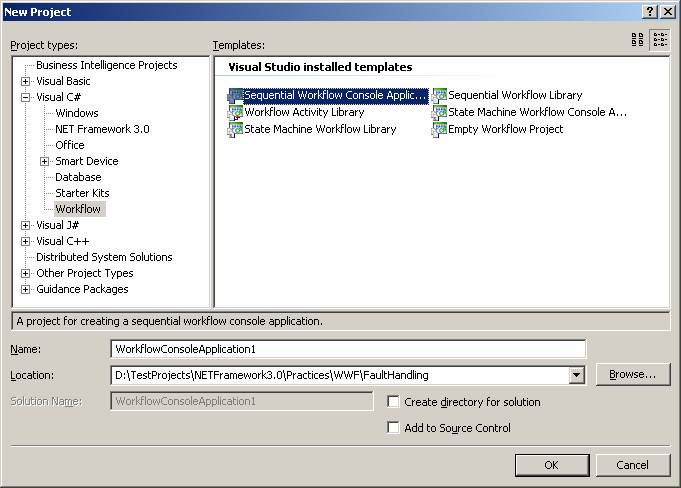
Strictly speaking, WWF offers two kinds of workflows: sequential workflows and
state machine workflows. This is evident in VS.NET
New Project dialog box:
Sequential workflows are characterized by the fact that the workflow is in control. It is the workflow that decides what happens next and which activity should next be executed. A typical sequential workflow example is when a customer selects products and then clicks the ‘Submit Order’ button. ‘Submit Order’ button starts a sequential workflow to calculate subtotal price, calculate discounts based on coupon, process payment details, and then process shipment details. Note how the workflow is in control of the whole process.
State Machine workflows on other hand are characterized by the fact that outside events (caused by users, processes, or even other workflows) are in control. It is events outside the workflow that decide what happens next. A typical state machine workflow example is the vending machine. The vending machine remains in the Idle activity until a customer drops a coin (this is the outside event). Once a coin is dropped, the vending machine switches to the Depositing activity to display how much more money needs to be inserted for the selected product. When the required amount has been deposited (again, this is an outside event), the vending machine switches to the Vending activity to vend the selected product. When the vending machine receives some hardware signal (again, this is an outside event), that the product has been vended, it switches to the Idle activity and remains there until another customer drops a coin and the whole process restarts again.
As mentioned previously, activities are the fundamental building blocks of a workflow. Building a workflow means combining activities to create the desired model for the problem at hand.
In WWF terms, an activity is simply a CLR type that derives (directly or
indirectly) from System.Workflow.ComponentModel.Activity. The
Activity base
class defines a set of properties and events, like any class, along with
execution logic that defines the activity's run time behavior. The following
diagram shows the state machine that each Activity-derived
class must implement:
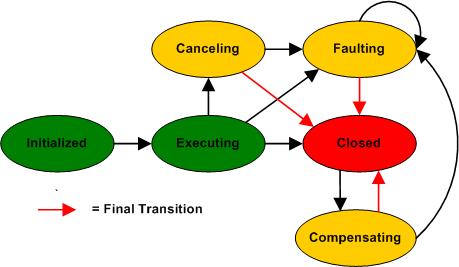
The state machine is reflected by the ActivityExecutionStatus enum. The
Activity
base class exposes a CLR event for each state that is raised whenever a
transition occurs:
|
An activity communicates with the workflow runtime engine via a well defined contract that is expressed using virtual methods on the Activity base class. The contract between the workflow runtime engine and an activity is expressed in terms of the following protected virtual methods:
Except for the Initialize method, all the other methods return the state that the activity is in when it returns control to the runtime.More details can be found in this article:‘Simplify Development With The Declarative Model Of Windows Workflow Foundation
Windows Workflow Foundations WWF ships with built-in activities for only two patterns: sequential and state-machine workflows. However, WWF is extremely extensible through custom activities. The set of predefined activities can be split into a few categories as shown below:
IfElse, While, CAG, Policy, Replicator, Throw, Suspend, Terminate, FaultHandler
These activities govern the sequence in which workflow activities execute.
Typical activities include conditional as well as looping constructs.
IfElse
activity works as a classic if statement while the Policy activity represent a
collection of rules (see Conditions and Rules
chapter). When the runtime engine
reaches an IfElse activity, it begins evaluation the condition of the various
branches proceeding from left to right. The first branch whose
Condition
property evaluates to true is run. Note that you can alter the evaluation order
by moving branches around through the commands in the activity’s context menu.
(See Basic Sequential Workflows example).
Note that you should use IfElse activity is you really need to control the flow of the workflow and orchestrate various blocks of code. But if what you need is just a sequence of programmatic If statements with simple code attached to branches, then use a Policy activity with a set of rules that make up the requires If statements (see Conditions and Rules chapter).
The While activity accepts a condition and evaluates it at the beginning of each iteration. If the condition is true, it runs a specified child activity and repeats until the condition becomes false. Note that only a single activity is permitted in the body of the While. For this reason, you might want to use a composite activity such as Sequence or Parallel to execute multiple activities in the loop. (The term "interleaved" is probably more appropriate than "parallel" here. There is no true concurrency going on with the Parallel activity, only interleavings within the same thread.)
Similar to a foreach statement, the Replicator activity creates and executes a given number of instances of the specified child activity. You can specify only one child activity, but using composite or custom activities is allowed. If no global condition is set through the UntilCondition property, the Replicator ends when all replicates have completed; otherwise, the activity terminates when the UntilCondition is true.
You can mix together conditional execution and loops in the ConditionedActivityGroup (CAG) activity. The CAG contains a number of child activities and runs them until a global condition is met. Basically, a CAG combines the behavior of While and IfElse activities. Its internal logic is expressed by the following pseudo code:
While condition
If child1.WhenCondition Then child1.Execute
If child2.WhenCondition Then child2.Execute
:
If childN.WhenCondition Then childN.Execute
End While
Each child activity has a WhenCondition property. Based on the evaluation of the specified condition, the activity is run or skipped in the current iteration. Note, though, that if the child activity has no WhenCondition set, it is executed only the first time and skipped for all subsequent iterations. All conditions are evaluated whenever required based state change dependencies. The CAG activity terminates after the UntilCondition returns true and immediately cancels any currently executing activities. If no condition is specified, CAG completes when no child activities are running either because they have no condition set or the condition evaluates to false.
TransactionScope, Sequence, Compensate, SynchroniationScope, Code, Parallel,
InvokeWorkflow, CallExternalMethod, CompenstableSequence,
CompensatableTransactionScope
These activities include constructs to terminate or suspend a workflow, throw an
exception, execute internal or external code, or spawn another workflow.
A sequential workflow that has no interleaved activities doesn't bother about
serializing access to shared members. However, operation is different when a
Parallel activity is used with two or more sequences running in an interleaved
manner (There is only one thread in a workflow instance at any one time. That
thread switches back and forth between the branches of the Parallel activity.)
SynchronizationScope provides a declarative and explicit way of
modelling
synchronized access of shared state within a given workflow instance across a
set of activities.
The TransactionScope object guarantees that the transaction is either committed or rolled back in case of failure and, more importantly, it determines whether you need a local or distributed transaction and enlists any necessary resources. The TransactionScope WWF activity is just a workflow wrapper for an instance of the TransactionScope .NET class. TransactionScope activity automatically rolls back if an exception is thrown from within the scope.
A related activity, CompensatableTransactionScope, also supports compensation. Compensation is the process of logically undoing the completed transactions in case of any subsequent business exceptions. Compensation differs from rollback in that it is a way to cancel the effects of a successfully completed and committed transaction when a rule is violated later in the workflow. By right-clicking on the CompensatableTransactionScope activity, you can switch to the compensation view of the transaction and add all the activities that would compensate the effects of the transaction.
EventDrive, Listen, HandleExternalEvent, EventHandlingScope, Delay
These activities include constructs to allow the workflow to synchronize with
the host environment. Events let the workflow handle received events, stop
waiting for external events or just wait (delay) before proceeding with the next
step.
WebServiceInput, WebServiceOuput, WebServiceFault, InvokeWebService.
These activities target a special feature of workflows – exposing the internal
engine as a web service.
SetState, State, StateInitialization, StateFinalization
These activities target a special feature of workflows – exposing the internal
engine as a state machine.