Several different architectures for the development of distributed applications exist today. So why have .NET Remoting? The very short answer is that .NET is centralized around well-known and well-defined standards like HTTP and SOAP.
It can be said that comparing .NET Remoting to other remoting architectures is like comparing COM development in C++ to that in VB! Whereas C++ programmers had to know the details of COM, VB programmers were able to concentrate on the business needs immediately without having to bother with the technical details of COM.
With .NET Remoting, this concept of absolute ease of development has been extended to the development of distributed applications. You do not have to define IDL files or go through proxy/stub compilation cycles as in Java RMI. And you do not even have to decide upfront on the encoding format or remote requests. Instead, you can switch from a fast binary format to SOAP format by modifying a single line in a configuration file. You can even provide both communication channels by adding another line to the configuration file. Further, you are not fixed on one platform on programming language as in COM+ and Java EJB. Also, configuration and deployment is much easier than that in COM/COM+
.NET can be as easy as you like or as complex as you like: The process of enabling remoting for an object can be as easy as writing two lines of code or as complex as writing your own transfer protocol and / or format.
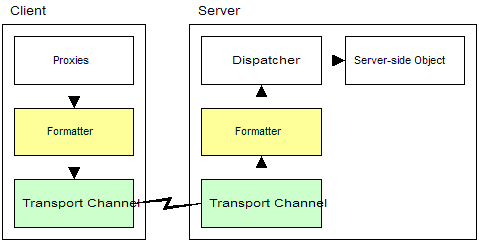
.NET Remoting offers the developer and administrator a greater choice of protocols and formats than any of the other remoting architectures. The following figure shows a simplified view of the .NET Remoting architecture:
Whenever a client holds a reference to a remote object, it will be represented by a TransparentProxy object, which, from the client's perspective, is the actual object. The proxy will allow all of the actual object's methods to be called on it (i.e., the proxy). Internally, whenever the client calls a method on the proxy, the method will be translated into a message that passes through different layers on its way to the actual remote object. The message will pass through a serialization layer - the Formatter - which converts it into a specific transfer format such as SOAP. The message then goes through the Transport Channel layer which transfers it to a remote process using a specific protocol such as HTTP or TCP. On the server side, the message is received by a Transport Channel which sends it over to a Formatter. The server-side formatter converts the serialized message back to the original message and forwards it to the Dispatcher. Finally the Dispatcher calls the target object's method and passes back the response values through all the previous layers.
Note that in contrast to other remoting architectures, most .NET Remoting layers can either be extended or removed altogether. You can even have additional layers chained to the baseline .NET Remoting Framework to allow for custom processing of messages. Further, you can easily switch between the different implementations of layers by changing the configuration file. A .NET Remoting application that uses TCP can be easily adjusted to use HTTP.
Most remoting systems like Java RMI and J2EE demand the manual creation of proxy/stub objects. The proxy encapsulates the client's connection to a remote object and forwards calls to a remote stub on the target server. The remote stub in turn passes the call to the actual object. In most cases, the source code for generating these proxy/stub components has to be written using some form of Interface Definition Language.
In contrast to this traditional approach, .NET Remoting uses a generic proxy for all kinds of remote objects. This is possible because .NET has been designed with Remoting in mind, as opposed to other architectures where remoting was retro-fitted into an existing programming model.
Note that the right approach in .NET Remoting design is to always separate interface definitions from their implementations. You can however, write both in the same language - in any .NET language. .NET Remoting provides several different ways of defining those interfaces as discussed below:
With a shared assembly, the server-side implementation of the object exists on the client as well. Only during instantiation that it will be determined whether a local object or a remote object will be created. Using a shared assembly allows for a semitransparent switch between invoking the local implementation (i.e., working offline) and invoking the server-side object (i.e., retrieve up-to-date prices).
When you create a distributed application, you define the base classes or interfaces to your remote objects in a separate assembly. This assembly is used on both the client and the server. The real implementation is placed only on the server and is typically a class that extends the base class or implements the interface.
The advantage is that you have a distinct boundary between the server and the client application, but you still have to build this intermediate assembly as well. While object-oriented practices encourage this approach, it will not work in all .NET Remoting scenarios.
This approach is the elegant one. You develop the server in the same way as when using the shared assemblies method. But instead of sharing the real DLL or EXE, you later extract the underlying metadata which contains the interface information, using SoapSuds.exe tool.
SoapSuds will either need a URL to a running server or the name of an assembly as a parameter, and will extract the necessary information (interfaces, base classes, objects passed by value, and so on). It will put this data into a new assembly which can be referenced by the client application. You can then continue to work as if you have separated this information right from the beginning.
For certain scenarios, especially when using client-activated objects, this is the recommended approach.
All current remoting frameworks support the automatic encoding of simple data types into the chosen transfer formats. The problem starts when you want to pass a copy of the object from the server to the client. There was no easy way to pass large object structured around.
In .NET Remoting, the encoding/decoding of objects is natively supported. You just need to mark such objects with the [Serializable] attribute or implement the ISerializable interface and the rest will be taken care of by the .NET Framework. This even allows you to pass your object cross-platform using XML.
In distributed applications, there are generally three ways to manage remote object lifetime:
When you use remote objects (as opposed to using copies of remotely generated object passed by value), .NET automatically keeps track of where they were generated. A client can therefore, ask one server to create an object and pass it as a parameter to another server. The second server will then directly execute the object's methods on the first server, without a round-trip to the client. Note that this means that there should be a direct way of communication from the second server to the first server (there should be no firewall or the required ports should be opened.)
All remote objects must be registered with the .NET Framework before these remote objects can respond to any incoming client calls. This registration process provides the .NET Framework will all information it needs to activate and manage the lifetime of remote objects. For example, the registration process informs the .NET Framework of the object type, its URI, and lifetime.
// Server-side
HttpChannel chnl = new HttpChannel( 1234);
ChannelServices.RegisterChannel( chnl)
// Client-side
HttpChanne chnl = new HttpChannel( /*Empty*/ );
ChannelServices.RegiaterChannel( chnl );
// Server - SAO
RemotingConfiguration.RegisterWellKnownServiceType (... )
// Server-CAO
RemotingConfiguration.ApplicationName = "SomeName";
RemotingConfiguration.RegisterActivatedServiceType( ... );
All the channels that were previously registered when objects are registered will be available to calling clients. This is because object registration gets
a list of registered channels and imbeds this information with each registered
remotable object. When a client calls a method on its remote object proxy, the method call is turned into a message and is transported over the relevant
channel to the remote server (or application domain) specified in the object's URL
known by the client. When the call arrives at the server, the .NET Framework uses the
ObjectUri also specified by the client (client specified
object location via a URL and object key via a URI) to locate the ObjRef in the internally maintained object identity table. If the ObjRef is found, the
object is activated and the method call is forwarded to the object.
The following section discusses the points mentioned above in more detail:
Channels are objects that transport messages between applications across remoting boundaries. These remoting boundaries can be application domains, processes, or computers. A channel can listen for inbound messages, send outbound messages, or both. This allows the usage of a wide variety of communication protocols, even if the CLR is not installed at the other end of the channel. In general, a channel must implement a few interfaces: IChannel is to provide informational properties such as name and priority. IChannelReceiver is to listen for a particular protocol on a given port. And IChannelSender to send information for a particular protocol on a given port.
A server application exposing remote objects may support more than one channel, and it is the responsibility of the client application to pick the channel best suited to meet the client's requirements. If a client does not register a channel and the client calls a method on a remote object, then one of the default channel implementations (HttpChannel or TcpChannel) will be loaded if one of them supports the client's network protocol. But if the client expects any callbacks or events from the remote object, then a channel must be registered. As for the server application that exposes remote objects, the server must register a channel so that client applications and communicate with the object.
Channels can be registered either programmatically using ChannelServices.RegisterChannel() or by registering the channel in the configuration file. Therefore, to summarize, servers must always register a channel. Clients must register a channel if they want to process callbacks or events.
ChannelServices provide static methods to aid with remoting channel registration, resolution, and URL discovery. Recall that a channel provides the extensibility point to convert messages to and from specific protocols. Probably the most widely used function is ChannelServices.RegisterChannel to register a channel with the channel services.
HttpChannel transports messages to and from a remote object using the SOAP protocol. All message pass through the SoapFormatter where the message is changed into XML and serialized and the required SOAP headers are added to the stream. The target stream is then transported to the target URI using the HTTP protocol. In particular, HttpChannel performs the following:
TcpChannel on the other hand uses a binary formatter to serialize all messages to a binary stream and transport the stream to a target URI using the TCP protocol. In particular, TcpChannel performs the following:
The TcpChannel opens and caches as many connections as there are threads making requests to another server at that moment. Socket connections are closes on the client after 15-20 seconds of inactivity.
Before discussing RemotingConfiguration class, the concepts of server-activated and client-activated objects must be understood. These concepts are explained fully in Types of Remoting, but here is a short introduction:
RemotingConfiguration provides various static methods for configuring the remoting infrastructure. In order for the client to connect to a remote object, whether it is an SAO or a CAO, it (the client) must know the object's location in the form of a URI. Once the URI is available, and once the client registers the channel it prefers with ChannelServices, a client can obtain a proxy for the remote object in one of two ways: calling new or calling one of the Activator class object creation methods (Activator.GetObject() for SAOs or Activator.CreateInstance() for CAOs).
Key Rule for clients accessing remote objects: The client application domain must possess the metadata of the remote object that it intends to call. The important issues to remember are as follows:
Building a .NET Remoting application often involves the following tasks (note that this list is by no means comprehensive):
The following steps are required to make remote objects accessible from outside the server's application domain. Design the service by deciding on the following points:
The above tasks are detailed below:
If you are implementing any other type of service, the client can obtain information in two ways:
The following steps are required to consume any service for use outside the application domain. Design the client by deciding on the following points:
The above tasks are detailed below:
This section illustrates how to create a sample .NET application that illustrates some of the .NET Remoting concepts. Note that there are two very different kinds of objects when it comes to Remoting: Objects that are passes by reference, and objects that are passed by value:
The following sample exposes a server-side MarshalByRefObject in Singleton mode. The object is called CustomerManager and it exposes a method that returns a by-value object back to the client.
When using remote objects both client and server must 1) Have access to the same interface definitions and 2) Have access to any serializable objects passed by value. This leads to the general requirements that any .NET Remoting application needs at least three assemblies:
For the Basic Remoting project, and in general, the implementation steps in order are:
Of special importance is the server assembly startup code, a variant of which is shown below:
/* This class represents the ServerStartup code. This is a very basic variant of registering a server-side
object. Note that names are hard-coded and no configuration files are used */
class ServerStartup
{
[STAThread]
static void Main(string[] args)
{
// All of the following three calls are from System.Runtime.Remoting namespace
Channels.Http.HttpChannel chnl = new System.Runtime.Remoting.Channels.Http.HttpChannel( 1234 );
Channels.ChannelServices.RegisterChannel( chnl );
RemotingConfiguration.RegisterWellKnownServiceType( typeof(CustomerManager),
"CustomerManager.soap",
WellKnownObjectMode.Singleton);
// Keep the server running until a key-press
Console.ReadLine();
}
}
A new http channel HttpChannel is created and configured to listen on port 1234 for client requests. The default transfer format for HTTP is SOAP. The channel is then registered in the remoting system using ResgisterChannel.This will allow incoming requests to be forwarded to the corresponding objects. The class CustomerManager is then registered as a WellKnownServiceType. The URL will be CustomerManager.soap. The extension .soap or .rem should be used for consistency. This is absolutely necessary when hosting components in IIS as it maps these extensions to the .NET Remoting Framework. Finally, the object mode is set to Singleton to ensure that only one instance of CustomerManager will exit. Note that the registered class is not directly bound to the channel. All available channels can be used to access all available objects.
Of special importance also is the client startup code, a variant of which is shown below:
class MainClient
{
// The Main method will register a channel, contact the server to get a Customer object, and then print
// the cutomer's age
[STAThread]
static void Main(string[] args)
{
// Register a channel
HttpChannel chnl = new HttpChannel();
System.Runtime.Remoting.Channels.ChannelServices.RegisterChannel( chnl );
// Create a local proxy that will support the ICustomerManager interface
ICustomerManager mgr = (ICustomerManager)System.Activator.GetObject( typeof(ICustomerManager),
"http://localhost:1234/CustomerManager.soap");
Console.WriteLine( "Obtained a reference to the remote CustomerManager object" );
// Now use the proxy to the CustomerManager just as you would use a normal local object
Customer customer = mgr.getCustomer( 1 );
String str = "Customer " + customer.strFirstName + " " + customer.strLastName + " is " + customer.GetAge() + " years old.";
Console.WriteLine( str );
// Press any key to terminate client (else client app will terminate quickly not allowing you to read the
// result). This is similar to a debug break to allow you to read results
Console.ReadLine();
}
}
Note that instead of using new to create the server-side object, we use the System.Activator class. Even though we specified the type of the object and its URL, this would not be necessary when using configuration files. The getCustomer method is executed on the TransparentProxy object. The first connection to the server is made when this method executes. When the method returns from the server, the object will be serialized and all public and private properties will be converted into an XML fragment. This XML document is encapsulated in a SOAP message and returned back to the client. The .NET Remoting Framework will implicitly convert the SOAP message into a Customer object and fills it with serialized data that has been obtained from the server. The client has now an exact copy of the Customer object created on the server. There is and there should be no difference between the server-side Customer object and the one generated on the client from serialization/deserialization. All methods will be executed in the client's context.
After the all three projects (General, Server, and Client) have been successfully compiled, you can run Client.Exe and then Server.exe to start the demo. The following illustrates output from both client and server.

