The function of the overall WPF property system, and of the dependency property concept in particular, is to provide facilities to compute a given property's value based on other properties. These other properties might include system properties such as themes and user preference, just-in-time property determination mechanisms such as data binding and animations/storyboards, multiple-use templates such as resources and styles, or values known through parent-child relationships with other elements.
The following section reviews the ways in which properties in WPF can be set.
XAML: The simplest way to set property values is to set them in XAML, by
declaring an element and setting the property value as an attribute. Local
property values have priority over any of the other ways that a property value
might otherwise be set, including styles.
On occasion, the underlying type of a property that you wish to set in XAML will
prove to be too complex to be practically expressed in a single string given as
an attribute. XAML language provides a language feature called property element
syntax to address these situations. The property element syntax allows you to
specify a property value with an object, by denoting the property itself as a
nested XML element in object.property form, which then can contain the XML
element representing the object value as a child element. For example:
<Button Content="Button!" Width="200">
<!-- The following uses property
element syntax -->
<Button.Background>
<ImageBrush ImageSource="wavy.jpg"/>
</Button.Background>
</Button>
Code-Behind: Setting WPF dependency property values in code is fundamentally no different than setting them in XAML. For example:
Button myButton = new Button();
myButton.Width = 200.0;
Resource: A local property value can also reference a resource. The following example shows how to define a SolidColorBrush resource and then use it as a property value:
<DockPanel.Resources>
<SolidColorBrush x:Key="MyBrush" Color="gold"/>
</DockPanel.Resources>
<TextBlock Foreground="{StaticResource MyBrush}" Text="Text" />
Data Binding: A local property value can reference a value through data binding. In this example, the data source is a class named MyData. For demonstration purposes, MyData class has a string property named ColorName, of which the value is set to "Red". In the following example, the background of the target button is explicitly bound to the ColorName property using the {Binding} syntax. Thus, the following example creates a button with a red background.
<DockPanel Name="root" xmlns="" xmlns:x="" xmlns:c="">
<DockPanel.Resources>
<c:MyData x:Key="myDataSource"/>
</DockPanel.Resources>
<DockPanel DockPanel.Dock="Top" HorizontalAlignment="Left"
VerticalAlignment="Top">
<DockPanel.DataContext>
<Binding Source="{StaticResource myDataSource}"/>
</DockPanel.DataContext>
<Button Background="{Binding Path=ColorName}" Width="150"
Height="30">I am bound to be RED!</Button>
</DockPanel>
</DockPanel>
The previous example also illustrates property-value inheritance: The <Button> element inherits the value of the DataContext dependency property and does not need to respecify it.
Styles: Styles have the notable advantage that one style can be applied to a multitude of instances of the same element type, can be applied selectively by named reference, and can be derived from parent styles through a "based-on" mechanism that is similar to a class hierarchy. Styles are particularly useful for setting properties that define application user interface (UI). Styles are typically defined in the resources section and defined in XAML, but can also be built up in procedural code. The following example creates a very simple style and then applies it directly to the Style dependency property of a Button:
<!-- Create a style -->
<Style x:Key="ButtonStyle">
<Setter Property="Control.Background" Value="Red" />
</Style>
<!-- Apply a style to the Style dependency property -->
<Button Style="{StaticResource ButtonStyle}">CANCEL ALL</Button>
Styles are covered in more detail here.
The purpose of dependency properties is to "provide a way to compute the value of a property based on the value of other inputs". This other information can include things such as resources/styles, values known through parent-child relationships, data bindings, system properties such as themes/user-preferences, etc.
In addition, a dependency property can be implemented to provide self-contained validation, default values, callbacks that monitor changes to other properties, and a system that can coerce property values based on potentially runtime information. Derived classes can also change some specific characteristics of an existing property by overriding dependency property metadata, rather than overriding the actual implementation of existing properties or creating new properties.
The standard pattern to use a property is to back the property with a private field whose type reflects the type of the property:
private int nID; // type
is int
public int UserID
{
get { return nID;}
set {nID = value; }
}
The WPF pattern on the other hand, uses an object of type DependencyProperty to back the property. The following is a summation of the terminology that is used when discussing dependency properties:
Dependency property: A property that is backed by a DependencyProperty.
Dependency property identifier: A DependencyProperty instance, which is obtained as a return value when registering a dependency property, and then stored as a member of a class. This identifier is used as a parameter in many of the APIs that interact with the WPF property system.
CLR wrapper: The actual get and set implementations for the property. These implementations incorporate the dependency property identifier by using it in the GetValue and SetValue calls, thus providing the backing for the property using the WPF property system
The following example, defines the UserID dependency property and shows how an instance of DependencyProperty is used to back the property:
public int UserID
{
get { return (int)GetValue(UserIDProperty );}
set { SetValue(UserIDProperty , value); }
}
public static readonly DependencyProperty UserIDProperty =
DependencyProperty.Register( ... );
The UserIDProperty member is the Dependency Property Identifier and provides the backing for the
UserID
property. The name of a 'Dependency Property Identifier' is important -
it is the name
of the property (UserID)
appended with the 'Property' suffix.
A normal property that is backed by a private field, is quite limited compared to a dependency property.
A dependency property, such as UserID, uses an object of type
DependencyProperty as a
backing store to allow the property to support Resources, Data binding,
styles, animation, metadata overrides, and property value inheritance:
All the examples shown previously in the Properties section are actually dependency properties. n general, properties that are read/write and that are implemented on UIElement or ContentElement or any class that inherits from these are implemented as dependency properties.
Consider the following example:
<Window xmlns="http://schemas.microsoft.com/winfx/2006/xaml/presentation"
xmlns:x="http://schemas.microsoft.com/winfx/2006/xaml">
<StackPanel>
<StackPanel.Resources>
<!-- Create a style that sets Background for all buttons
-->
<Style
TargetType="{x:Type Button}">
<Setter Property="Background" Value="Red"/>
</Style>
</StackPanel.Resources>
<!-- Button
locally sets Background property -->
<Button Background="Green"
Width="200" Content="I am NOT red!"></Button>
<!-- Button
implicitly sets Background property via Style-->
<Button Width="200" Content="I
am styled red"></Button>
</StackPanel>
</Window>
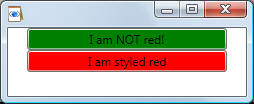
The example includes a style that applies to ALL buttons and their Background property. For the first button, the Background property is locally set, in other words, it is set directly on the object, and this locally set value takes precedence over the background that comes from the style setter. For the second button however, there is no local value, and thus the background in that button comes from the style setter.
When you get the value of a dependency property, you are potentially obtaining a
value that was set on that property through any one of the other property-based
inputs that participate in the WPF property system.
These are applied in a particular order.
Running animations. Once started, animations are promoted over even locally set values.
Locally set values set via XAML or code. Data binding or resource references are considered equivalent to locally set values in terms of precedence.
Applied templates (templates are a specialized element construction technique used in styles).
Implicit by-type styles in page or application.
Explicit keyed styles in page or application.
Theme styles. These are typically applied to common controls, such as Button.
Dependency property default value; this is established when registering the dependency property with the property system, and can also be overridden along with other dependency property metadata by any subclass that either adds itself as owner or chooses to otherwise override the base implementation's metadata.
Some of the dependency properties defined in the WPF are read-only. The typical reason for specifying a read-only dependency property is that these are properties that should be used for state determination. For example, the property IsMouseOver is really just surfacing state as determined from the mouse input. Any attempt to set this value programmatically by circumventing the true mouse input would be unpredictable and would cause inconsistency
Despite not being settable, read-only dependency properties still have some of the additional capabilities supported by dependency properties in the property system. The most important remaining capability is that the read-only dependency property can still be used as a property trigger in a style. You can't enable triggers with a normal common language runtime (CLR) property; it needs to be a dependency property.
When implementing read-only properties, note the following points:
Call the RegisterReadOnly method instead of the normal Register method for property registration.
When implementing the CLR wrapper property, make sure that the wrapper too doesn't have a set implementation.
The object returned by the read-only registration is DependencyPropertyKey rather than DependencyProperty.
Consider the following example which illustrates the concept of attached properties:
<DockPanel>
<TextBox DockPanel.Dock="Top" />
</DockPanel>
The System.Windows.Controls.DockPanel.Dock property is an
attached property
because it is designed to be set on child elements contained within a
DockPanel element, rather than on a DockPanel element itself. Note that the syntax is usually
AttachedPropertyProvider.PropertyName.
Therefore, an attached property is a specialized form of a dependency property
that is intended to be settable on any object. A specific application of this
scenario was shown above: having child elements inform the parent how they wish
to be presented in the user interface (UI). In WPF, most of the attached
properties that exist on WPF types are implemented as dependency properties.
Attached properties are a XAML concept, whereas dependency properties are a WPF
concept.
The type that defines attached properties typically follows one of the following models:
The defining type can be the
parent element of the child elements that will set values for the attached property
(see example above).
The type iterates its child elements through internal logic, obtains the values
of the attached properties,
and acts on them.
The type that defines the attached property will be used as the
child element for a variety of possible parent elements and content models.
The defining type represents a service and other types set values for the attached property. When the element that set the property is evaluated in the context of the service, the attached property values are obtained through internal logic of the service class.
For example, DockPanel defines the DockPanel.Dock attached property. A DockPanel instance will always check to see whether any of its immediate child elements have set a value for DockPanel.Dock. If so, those values become input for the rendering logic applied to that particular child element. Nested DockPanel instances each treat their own immediate child element collections. If the DockPanel.Dock attached property is set on an element that has no DockPanel parent element to act upon it, no error or exception is raised. This simply means that a global property value was set, but it has no current DockPanel parent that could consume the information.
The owner type of the attached property must implement dedicated accessor methods in the form GetPropertyName and SetPropertyName. These dedicated accessor methods are also how you must get or set the attached property in code. From a code perspective, an attached property is similar to a backing field that has method accessors instead of property accessors. The following example shows how to set an attached property in code:
// Create elements
DockPanel myDockPanel = new DockPanel();
CheckBox myCheckBox = new CheckBox();
// Set content and docking values. Note how the affected
element is added to the attached-property
// provider 'DockPanel' before using the service 'SetDock' of the
attached-property provider
myCheckBox.Content = "Hello";
myDockPanel.Children.Add(myCheckBox);
DockPanel.SetDock(myCheckBox, Dock.Top);
You might create an attached property when there is a reason to have a property setting mechanism available for classes other than the defining class. The most common scenario for this is layout. Examples of existing layout properties are DockPanel.Dock, Panel.ZIndex, and Canvas.Top. The scenario enabled here is that elements that exist as child elements to layout-controlling elements are able to express layout requirements to their layout parent elements individually, each setting a property value that the parent defined as an attached property.
Attached properties in WPF do not have the typical CLR wrapper methods for easy get/set access. The owner type of the attached property must implement dedicated accessor methods in the form GetPropertyName and SetPropertyName. These dedicated accessor methods are also how you must get or set the attached property in code. The following example shows how to create an attached property:
/* Define your attached property as a dependency property by declaring a public
static field of type DependencyProperty. You define this field by using the
return value of the RegisterAttached method.
The field name must match the attached property name, appended with the string
Property
*/
public static readonly DependencyProperty IsBubbleSourceProperty =
DependencyProperty.RegisterAttached
(
"IsBubbleSource",
typeof(Boolean),
typeof(AquariumObject),
new FrameworkPropertyMetadata(false,
FrameworkPropertyMetadataOptions.AffectsRender)
);
/* The attached property provider must also provide static Get[PropertyName] and
Set[PropertyName] methods as accessors for the attached property.
The signature for the Get[PropertyName] accessor must be:
public static object Get PropertyName (object target )
The signature for the Set[PropertyName] accessor must be:
public static void Set PropertyName (object target , object value )
*/
public static void SetIsBubbleSource(UIElement element, Boolean value)
{
element.SetValue(IsBubbleSourceProperty, value);
}
public static Boolean GetIsBubbleSource(UIElement element)
{
return (Boolean)element.GetValue(IsBubbleSourceProperty);
}
When you register a dependency property you can also specify a callback method that will be used to validate the value of the dependency property. The callbacks are implemented such that they are provided an object value, and return true if the provided value is valid for the property, and false otherwise. The callbacks are used by the property system in a variety of different operations. This includes the initial type initialization by default value, programmatic change by invoking SetValue, or attempts to override metadata with new default value provided. A common use of validation callbacks is validating enumeration values, or constraining values of integers or doubles when the property sets measurements that must be zero or greater.
The following example shows how to set a callback on a dependency property:
public static readonly DependencyProperty
CurrentReadingProperty =
DependencyProperty.Register( "CurrentReading",
typeof(double),
typeof(Gauge),
new FrameworkPropertyMetadata( Double.NaN,
FrameworkPropertyMetadataOptions.AffectsMeasure,
new PropertyChangedCallback(OnCurrentReadingChanged),
new CoerceValueCallback(CoerceCurrentReading)),
new ValidateValueCallback(IsValidReading)
);
public doubleCurrentReading
{
get { return (double)GetValue(CurrentReadingProperty ); }
set { SetValue(CurrentReadingProperty , value); }
}
The validation callback is not part of property metadata and as such it cannot be overridden by a new implementation. The callbacks are implemented such that they are provided an object value. They return true if the provided value is valid for the property; otherwise, they return false.
See MSDN for more details.
Recall that a dependency property is a property that is registered with WPF by calling Register or RegisterReadOnly and that is backed by field whose type is DependencyProperty. This allows you to enable a property to support styling, data binding, animation and default values. Dependency properties can be used only by DependencyObject types, but DependencyObject is quite high in the WPF class hierarchy, so the majority of classes available in WPF can support dependency properties.
Examples of dependency properties implemented by WPF include Height, Width, Background and Text properties (among many other). Each dependency property such as Background exposed by a class such as Button has a corresponding public static field of type DependencyProperty exposed on that same class (Button). This is the identifier for the dependency property that stores the underlying data. For example, for the Background property, the dependency property identifier (i.e., the public static field) is BackgroundProperty.
As a consumer of established dependency properties, you do not
typically use the DependencyObject methods
GetValue and SetValue,
which are the connection point to the underlying property system. Rather, the
existing implementation of the CLR properties will have already called
GetValue and SetValue
within the get and set
wrapper implementations of the property, using the identifier field
appropriately
When do you need to implement your own dependency property?
You should implement a property as a dependency property when you want your
property to support one or more of the following scenarios:
You want your property to be settable in a style.
You want your property to be data bindable.
You want your property to be settable with a dynamic resource reference.
You want to inherit a property value automatically from a parent element in the element tree.
You want your property to be animatable.
You want the WPF property system to report when the previous value of your dependency property has been changed (by the user, environment, WPF property system, etc). Using metadata settings, your property can specify a callback function that will be invoked when your custom dependency property value has changed.
The first step in implementing a custom dependency property is to register the dependency property in a table maintained by the WPF property system. To register a dependency property, you must call Register within your class but outside any member functions. The reason that the Register call is done outside of other member definitions is because you use this return value to assign and create a public static readonly field of type DependencyProperty as part of your class. This field becomes the identifier for your dependency property. For example:
public static readonly DependencyProperty
MyBackgroundProperty =
Register( "MyBackground", typeof(Color), typeof(MyControl),
new FrameworkPropertyMetadata(null,
FrameworkPropertyMetadataOptions.AffectsRender,
new PropertyChangedCallback(OnUriChanged))
);
The second step is to implement a wrapper that calls GetValue and SetValue in get and set, respectively:
public Color
MyBackground
{
get
{ return (Color)GetValue(MyBackgroundProperty
); }
set { SetValue(MyBackgroundProperty
, value); }
}
Note that registering a dependency value with the WPF property system creates an
associated metadata object that stores property characteristics. Many of these
characteristics assume default values if the property is registered with the
simple signatures of Register (as in the example
above). Other signatures of Register allow you to specify
the metadata you want to associate with the property. The most common metadata
given for a dependency property is the default value that is applied on new
instances that use the property.
If you are creating a dependency property that exists on a class derived from
FrameworkElement, you can use the more specialized metadata class
FrameworkPropertyMetadata rather than the base
PropertyMetadata class. The
constructor for the FrameworkPropertyMetadata class has several signatures where
you can specify various metadata characteristics in combination.
For example, by default, dependency properties support data binding. You can
deliberately disable data binding with metadata. Also, by default, data binding
Mode for
dependency properties defaults to OneWay. You can always change the binding to
be TwoWay per binding instance, again with metadata.
Finally, note that to avoid potential issues with runtime initialization, you
should not set dependency property values within constructors of classes. This
is because the WPF property system exposes virtual methods internally, and class
constructors, in general, should not call virtual methods (vtable initialization
is incomplete).
Recall that registering a dependency value with the WPF property system creates an associated metadata object that stores property characteristics such as:
Default value for the dependency property.
References to callback implementations.
Data binding direction.
etc.
Dependency-property metadata exists as an object that can be queried to examine the characteristics of a dependency property. Metadata associated with a dependency property can be returned as PropertyMetadata object when you call the various GetMetadata overloads.
Overriding metadata is primarily so that you have the opportunity to change the
various metadata-derived behaviours that are applied to the property as it exists
on your type. Recall that property metadata can be supplied for a property
during the registration call (Register). However, in many cases, you might want
to provide type-specific metadata for your class when it inherits that property.
You can do this by calling the OverrideMetadata method.
For an example from the WPF APIs, the
FrameworkElement class is the type that
first registers the Focusable property. But the
Control class overrides that
property's metadata to provide its own initial default value, changing it from
false to true, and otherwise re-uses the original
Focusable implementation.
A class can add itself as an owner of a property that has already been
registered, by using the AddOwner method. This enables the class to use a
property that was originally registered for a different type.
The adding class is typically not a derived class of the type that first
registered that property as owner. Effectively, this allows your class and its
derived classes to "inherit" a dependency property implementation without the
original owner class and the adding class being in the same class hierarchy. In
addition, the adding class (and all derived classes as well) can then provide
type-specific metadata for the original dependency property.
The exact order and logic that is used to determine dependency property values is reasonably complex. For example, in the following XAML, Background property for a Button is set in three different places. Which Background value will be applied?
<Button Content="Test" Background="Red">
<Button.Style>
<Style TargetType="{x:Type Button}">
<Setter
Property="Background" Value="Green"/>
<Style.Triggers>
<Trigger Property="IsMouseOver" Value="True">
<Setter Property="Background" Value="Blue" />
</Trigger>
</Style.Triggers>
</Style>
</Button.Style>
</Button>
If you set a value locally you can expect that the value will be honored, even above any styles or control templates. Here in the example, Background is set to Red locally. Therefore, the style defined in this scope, even though it is an implicit style that would otherwise apply to all elements of that type in that scope, is not the highest precedence for giving the Background property its value. If you removed the local value of Red from that Button instance, then the style would have precedence and the button would obtain the Background value from the style. Within the style, triggers take precedence, so the button will be Blue if the mouse is over it, and Green otherwise.
The following is the definitive order that the property system uses when assigning the run-time values of dependency properties. Highest precedence is listed first:
Property system coercion.
Active animations, or animations with a Hold behavior.
Local value. A local value equates to setting an attribute or property element in XAML, or by a call to the SetValue API using a property of a specific instance. If you set a local value by using a binding or a resource, these each act in the precedence as if a direct value was set.
TemplatedParent template properties. An element has a TemplatedParent if it was created as part of a template (a ControlTemplate or DataTemplate). The TemplatedParent concept exists only for child items within a visual tree that come into existence through the application of the template. Within the template, the following precedence applies:
Triggers from the TemplatedParent template.
Property sets (typically through XAML attributes) in the TemplatedParent template.
Implicit style. Applies only to the Style property.
Style triggers. The triggers within styles from page or application.
Template triggers. Any trigger from a template within a style, or a directly applied template.
Style setters. Values from a Setter within styles from page or application.
Default (theme) style. Within a default style, the following order of precedence applies:
Active triggers in the theme style.
Setters in the theme style.
Inheritance. A few dependency properties inherit their values from parent element to child elements, such that they need not be set specifically on each element throughout an application.
Default value from dependency property metadata. Any given dependency property may have a default value as established by the property system registration of that particular property. Also, derived classes that inherit a dependency property have the option to override that metadata (including the default value) on a per-type basis. Because inheritance is checked before default value, for an inherited property, a parent element default value takes precedence over a child element.
Dynamic resource references and binding operations are both treated as if they were setting the value to which they are being applied. For instance, a dynamic resource applied to a local value acts per precedence item 3, a binding for a property setter within a theme style applies at precedence item 9, and so on. Because dynamic resource references and binding must both be able to obtain values from the run time state of the application, this entails that the actual process of determining the property value precedence for any given property extends into the run time as well.
Property value inheritance enables child elements in a tree of elements to obtain the value of a particular property from parent elements, inheriting that value as it was set anywhere in the nearest parent element. The parent element might also have obtained its value through property value inheritance, so the system potentially recurses all the way to the page root. Property value inheritance is not the default property system behavior; a property must be established with a particular metadata setting in order to cause that property to initiate property value inheritance on child elements.
Consider this example which was shown previously:
<DockPanel Name="root" xmlns="" xmlns:x="" xmlns:c="">
<DockPanel.Resources>
<c:MyData x:Key="myDataSource"/>
</DockPanel.Resources>
<DockPanel DockPanel.Dock="Top" HorizontalAlignment="Left"
VerticalAlignment="Top">
<DockPanel.DataContext>
<Binding Source="{StaticResource myDataSource}"/>
</DockPanel.DataContext>
<Button Background="{Binding Path=ColorName}" Width="150"
Height="30">I am bound to be RED!</Button>
</DockPanel>
</DockPanel>
In this example, the data source is a class named MyData. For demonstration purposes, MyData class has a string property named ColorName, of which the value is set to "Red". The <Button> element inherits the value of the DataContext dependency property and does not need to respecify it. The background of the target button is then explicitly bound to the ColorName property using the {Binding} syntax without having to specify the binding source since it was inherited.
By changing a custom property's metadata, you can also make your own custom properties inheritable. Note, however, that designating a property as inheritable does have some performance considerations. In cases where that property does not have an established local value, or a value obtained through styles, templates, or data binding, an inheritable property provides its assigned property values to all child elements in the logical tree.
To make a property participate in value inheritance, create a custom attached property, as described above n How to Create an Attached Property. Register the property with metadata (FrameworkPropertyMetadata) and specify the Inherits option in the options settings within that metadata. Also make sure that the property has an established default value, because that value will now inherit. Although you registered the property as attached, you might also want to create a property "wrapper" for get/set access on the owner type, just as you would for an "nonattached" dependency property. After doing so, the inheritable property can either be set by using the direct property wrapper on the owner type or derived types, or it can be set by using the attached property syntax on any DependencyObject.